
Designers create products customers genuinely want to use with a systematic, user-first approach known as the UX design process. UX depends on study, testing, and iteration rather than guessing what users desire.
Following a defined UX process enables one to find the UX problems before development, hence saving time, money, and rework. This is why professional UI UX design services always begin with experience strategy, not visuals.
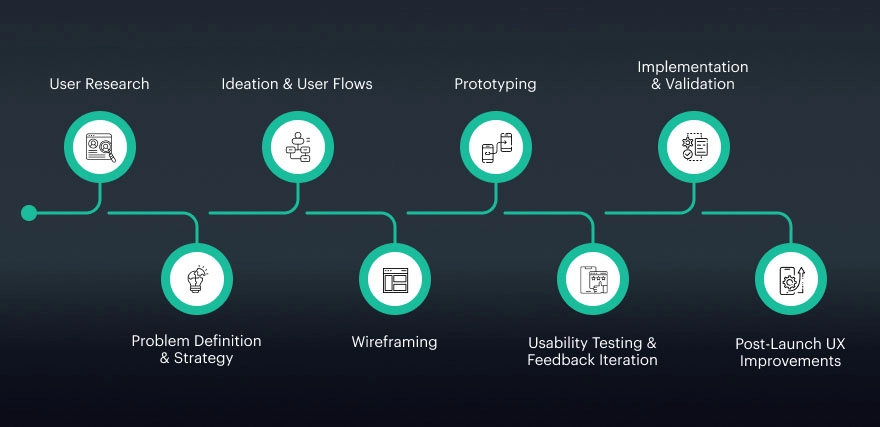
User Research: Understanding People First
The UX design process’s foundation is user research since it centres on learning actual consumers before any design choices are taken. Designers find out what really matters to their users by at this stage learning about their goals, behaviour, expectations, and problems at this stage.
Rather than relying on personal opinions or intuitions, UX designers get evidence using interviews, questionnaires, usability tests, and data analysis. This clarifies patterns in user thought and engagement with digital products, therefore exposing challenges that users sometimes cannot precisely define.
User research helps find real needs and frustrations that direct design by looking at what users do rather than only what they say. It guarantees that solutions are constructed around actual human behaviour rather than internal hypotheses, thus lowering bias, avoiding guesswork, and helping to eliminate internal assumptions.
Many companies opt to collaborate with a seasoned UI/UX design agency that gives user insight as the starting point for every effective design strategy because studies have shown research-led products to outrank rivals in usability and engagement.
- Methods include interviews, surveys, usability studies, and data analysis.
- Helps identify what users need, not just what they say.
- Reduces assumptions and design bias.
2. Problem Definition & Strategy
After user research is over, the following step is to precisely identify the issue the goods have to solve. This stage turns raw research data into a meaningful direction. Designers consider commercial objectives like growth, retention, or conversion as well as observations to find true user pain points, general irritations, and unmet needs. Rather than constructing based on presumptions, the group agrees on what challenge really matters and why it has to be addressed.
As described, the issue binds all parties around a common vision. Business teams, designers, product managers, and engineers work together to ensure that everyone is on the same page. To help teams assess whether the design is successful when live, problem statements, experience objectives, and success indicators are set forth currently.
This alignment is fundamental to providing significant UI UX design that balances business value with usability, which explains why every professional UI/UX design business still places it at the top of their attention.
- Identifies user pain points and business goals.
- Aligns stakeholders around a shared vision.
- Sets success metrics and experience goals.
3.Ideation & User Flows:
Once the problem has been clearly stated, ideation and user processes are used to explore potential solutions. Designers develop ideas at this stage based on research findings of actual consumer needs, actions, and objectives. The aim is to think imaginatively while remaining user-focused, to guarantee that suggested solutions fix usability issues rather than add unnecessary features.
Once ideas have been polished, designers create user flows, step-by-step product progression for consumers. These flows show interactions, decision points, and system reactions, hence helping designers to provide a consistent and easy navigation experience. By visualising the entire journey early, teams can identify friction points and simplify interactions before moving on to wireframes or visual design.
- Brainstorming ideas based on user needs.
- Creating user flows to show step-by-step interactions.
- Ensuring navigation feels logical and intuitive.
4. Wireframing: From SketchToStructure
Wireframing is the method by which initial ideas are transformed into a clean structural arrangement of the product. It shows screen design as well as the positioning of content, buttons, and useful components. By emphasising layout, spacing, and hierarchy rather than visual design, wireframes ensure consumers know where to go and what to do. Low-fidelity wireframes’ basic forms and placeholders foster usability talks rather than about fonts or colours.
This level lets designers swiftly test ideas and improve workflows before delving into thorough visual design. Early input can be collected and modifications made with little labour because wireframes are quick to produce and simple to change. Teams go ahead with more clarity, saving time and guaranteeing a simpler transition into UI design and development by addressing structural problems early on.
5. Prototyping: StimulatingTheExperiences
Converting wireframes into interactive experiences that closely reflect the functioning of the final product is known as prototyping. Stakeholders and users may click, scan, and travel the design rather than see static screens so as to more certainly grasp the overall movement. While high-fidelity prototypes closely mimic final images, animations, and interface components, low-fidelity prototypes could emphasise important interactions and frames.
Before the project starts, this phase is essential for confirming design choices. Teams testing usability and gathering feedback devoid of coding help early detection of issues, so helping to prevent expensive late alterations. Furthermore, encouraging understanding and agreement among stakeholders, designers, and developers ensures that every party has the same knowledge of the product’s look, feel, and performance.
- Can be low-fidelity (clickable layouts) or high-fidelity (near-real visuals).
- Helps stakeholders and users experience the flow.
- Enables early testing without writing code.
6. Usability Testing & Feedback Iteration
One technique of evaluating a design with real users to determine how efficiently they complete significant tasks is usability testing. Designers observe consumers interacting with the product to determine areas of trouble and where they go over easily, rather than hypothesising. Finding friction points like indistinct navigation, ambiguous labels, or interactions that do not function as users anticipate is made easier by this technique. Observing user behaviour provides ideas you just cannot acquire from design reviews.
Designers improve the interface depending on real user input when these concerns have been discovered. Small modifications, including button placement, simplification of a flow, or on-screen guidance clarification, can significantly improve usability. This process of testing, learning, and improving continues until the encounter seems natural and easy. Early testing and the continual process teams help guarantee the ultimate result really addresses user requirements rather than simply seeming excellent on screen.
- Observing how users complete tasks.
- Identifying confusion, delays, or errors.
- Refining designs based on real feedback.
7. Implementation & Validation
Once the UX design is finished, the next action is development to give it life. Designers provide the development team with design files, interaction directions, and thorough design requirements so that every component is exactly realised. These documents ensure the original design goal is maintained by outlining user flows, interactive behaviour, and layouts. Here, good communication helps to prevent misconceptions, reduce rework, and assure the product meets the approved user experience.
Designers collaborate with developers directly on the construction process. They evaluate the initial releases, answer questions, and validate usability together. This allows the team to figure out if accessibility standards have been met, whether the interactions are functioning as expected, and if the navigation looks clear. Any issues identified are refined before launch. This collaborative phase is where strong UI UX design services transform carefully planned designs into real, functional digital products that users can confidently and comfortably use.
- Clear documentation and interaction guidelines are shared.
- Designers collaborate with developers to ensure accuracy.
- UX is validated during development builds.
8. Post-Launch UX Improvements
UX design is never complete with the debut of a product. In several respects, actual learning starts when people begin using it in daily circumstances. Designers may learn how consumers traverse the product, where they have trouble, and which features they use most by observing their behaviour using analytics tools. This information exposes latent usability problems and points up chances to significantly enhance the general experience.
In this phase as well, user input counts quite a lot. Straight knowledge of what users like, dislike, or find unclear comes from reviews, surveys, and support questions. Design teams constantly improve layouts, navigation, and interactions using this data to create a more user-friendly and pleasurable product. Long-term UX strategy offers, because of this continuous improvement process. Over time, it helps digital products stay relevant, user-friendly, and competitive.
- Monitoring user behaviour through analytics.
- Gathering feedback and identifying improvement areas.
- Continuously refining the experience.
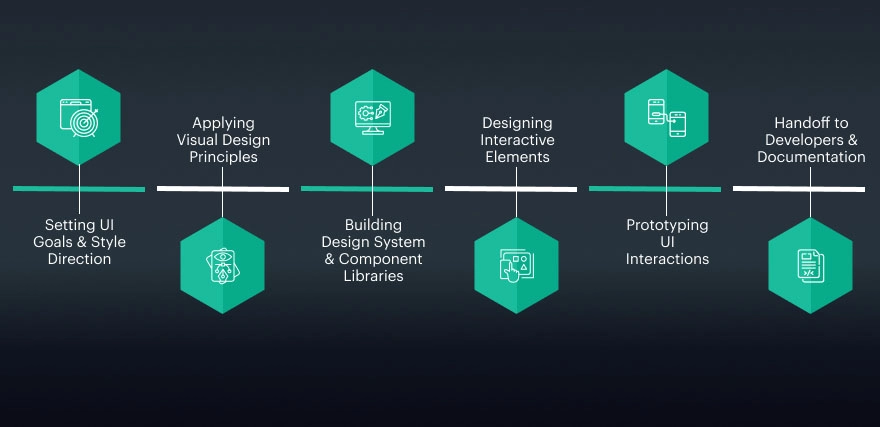
1.Setting UI Goals & Style Direction
The UI design phase centres on changing the look and feel of a digital product for the user. UI provides the journey visual life, but UX decides it. UI design guarantees every screen is clean, consistent, and easy to use, from colours and typefaces to buttons and animations. Studies show that users develop a visual first impression of a website in less than 50 milliseconds; A good user interface can easily create or erase confidence. This is the reason many businesses utilise skilled UI UX design to create interfaces appearing to be contemporary and easy.
- Specify the general visual identity of the item.
- Match the user experience with the brand’s personality and ideals.
- Know what expectations the target audience has and what they like.
2.Applying Visual Design Principles
Designers focus on basic visual elements, colour, typography, layout, spacing, and contrast, after the direction has been decided upon. Readers approach and understand content thanks in part to these considerations. Good colour contrast increases legibility; balanced designs help people to concentrate on important tasks.
- Designers employ colour to direct attention, emphasise key events, and preserve brand identification.
- Readability, scalability, and visual balance of content across devices are guaranteed by typography.
- Spacing and layout facilitate the arrangement of information so that consumers may swiftly absorb material.
3.Building Design System & Component Libraries
Designers utilise recyclable components like buttons, icons, forms, and typographical treatments to create uniform design systems. These systems help teams design faster while keeping the interface uniform across platforms. Design systems also reduce design and development errors by nearly 30%, making them a core part of modern UI UX development services.
- Design systems offer reusable UI components, including buttons, icons, forms, and typographic styles.
- They aid in visual and practical consistency across all platforms and displays.
- Pre-defined parts let teams create and build faster rather than starting fresh.
4.Designing Interactive Elements
UI design is about how elements react to user input, not only about static screens. Buttons alter states; menus animate; and feedback shows when tasks are finished. Users are led by these microinteractions, which also help to make the experience seem human and responsive. Good UI/UX design depends much on the interface interaction since it enables consumers to feel in charge of the interface and improves usability.
- UI design goes beyond static screens and focuses on how users interact with elements.
- Buttons change states when hovered, clicked, or disabled to show clear feedback.
- Animations guide attention and make transitions feel smooth and natural.
5.Prototyping UI Interactions
Before beginning development, designers might utilise prototypes to observe how the interface responds. These clickable models help teams in early detection of usability or visual problems by simulating actual-world interactions. Prototyping speeds approvals and helps designers and developers communicate less often. Many UI UX design services companies use high-fidelity prototypes to validate design decisions before coding starts.
- Prototypes simulate how users will interact with the interface before development begins.
- Clickable models help visualise navigation, transitions, and screen flow.
- Designers can identify visual or usability issues early in the process.
6. Handoff to Developers & Documentation
Transferring the UI design to the development team is the last stage. To guarantee that the interface is constructed precisely, designers offer comprehensive specifications, resources, and interaction guidelines. Having clear documentation guarantees that the finished product reflects the original design concept.
Effective cooperation transforms abstract ideas into actual, usable digital products right here.
- Designers give thorough UI specifications including component behaviour, colours, typography, and spacing.
- All visual components icons, photographs, fonts are arranged and sent in the suitable formats.
- Interaction rules Explain how buttons, animations, and transitions should work.
A set of strong UI/UX design tools that bring ideas to life powers every flawless digital experience. Cooperation, developer handoff, wireframing, and prototyping are made easier by means of these technologies.
Professional designers use digital design tools to achieve consistency and expedite their processes in actual life. Using the right tools enhances the design process and boosts user interest both when you work alone and when you hire a UI/UX design firm.
1.Figma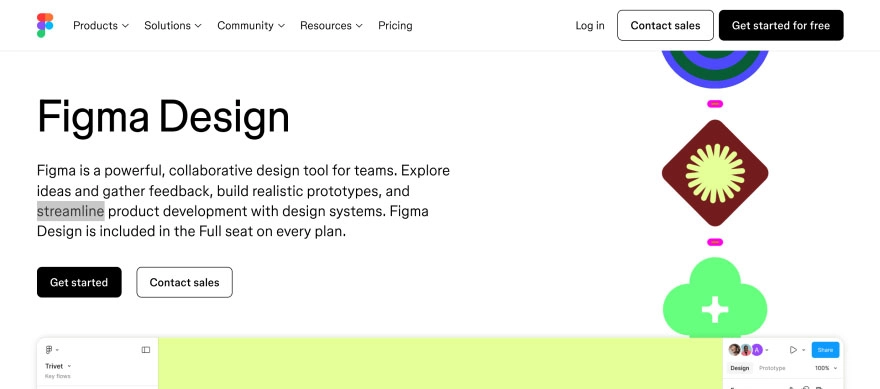
Because Figma is a cloud-based design tool, designers, developers, and stakeholders may link quickly. Many people working on the same file speed up and remove the comments. Normally, this holds for high-fidelity UI designs, wireframes, and interactive prototypes.
2.Adobe XD
Designers using Adobe XD can generate wireframes, user interface layouts, and interactive prototypes. With its outstanding compatibility with other Adobe applications, including Photoshop and Illustrator, among graphic designers, it is a frequently used tool. Especially easy with Adobe XD, interface interactions and user flow testing are done before development begins.
3.Sketch
For its simplicity and robust UI-focused features, Sketch is a vector-based design instrument. It helps designers create reusable components, design systems, and interface designs. It’s widely used by macOS users and remains a favourite among many UI UX design companies for building clean, structured interfaces.
4.Balsamiq
Designed to enable designers to rapidly sketch layout ideas without emphasising visuals, Balsamiq is a low- fidelity wireframing tool. Early-stage UX planning benefits greatly from testing structure and usability rather than aesthetics. Many teams use Balsamiq in the stages of idea validation and user research.
5.InVision
Designers may produce interactive mock-ups and get feedback using the prototyping and collaboration tool InVision. Direct comments from stakeholders on designs facilitate better communication. Especially for projects including UI UX design and development services, this tool enables designers, customers, and developers to be brought together.


15 IoT Solutions for Business to Transform Your Smart Warehouse Operations
In the rapidly evolving landscape of global logistics, the traditional warehouse is no longer just a storage facility; it has

IoT Solutions for Business: 10 Things to Know Before Hiring Engineers
The landscape of IoT solutions for business has undergone a radical transformation. As we move through 2026, the Internet of

Why DevSecOps is a Must for Bespoke Software Development in 2026
In the rapidly evolving digital landscape of 2026, the traditional boundaries between development and security have not just blurred, they
