Category: Android App Development

  • How to Develop a High-Performing Social Commerce Application for the UK Market

    How to Develop a High-Performing Social Commerce Application for the UK Market

    The retail landscape in the United Kingdom is undergoing a seismic shift. As we navigate through 2026, the traditional boundaries between “socializing” and “shopping” have effectively dissolved. Social commerce, the integration of e-commerce directly within social media platforms or the creation of dedicated social shopping apps, is no longer a secondary channel; it is the primary engine of growth for modern brands.

    With the UK social commerce market projected to reach a staggering £11.75 billion by the end of this year, businesses are racing to capture the attention of Gen Z and Millennial consumers who view shopping as a community-driven, interactive experience. For business owners, CTOs, and marketing heads, the question is no longer “should we build a social commerce app?” but “how do we build one that outperforms the competition in a crowded UK market?”

    In this comprehensive guide, we will dissect the technical, strategic, and design requirements for building a high-performing social commerce application tailored specifically for the British consumer.


    Table of Contents

    1. The UK Social Commerce Landscape in 2026
    2. Strategic Tech Selection: The Power of React Native
    3. Core Features for the British Consumer
    4. Architecture for Scalability and Speed
    5. Integrating with Major Marketplaces
    6. UI/UX Design: Converting Browsers into Buyers
    7. Compliance and Security: Navigating UK Regulations
    8. Common Mistakes in Social Commerce Development
    9. The Development Roadmap
    10. FAQ

    The UK Social Commerce Landscape in 2026

    The UK market presents a unique set of challenges and opportunities. Unlike the US market, which is dominated by massive generalist platforms, UK consumers show a high degree of affinity for curated, niche marketplaces and “Best of British” initiatives.

    Key Statistics Driving the Industry

    • Market Value: The UK social commerce sector is growing at a compound annual growth rate (CAGR) of 34.5%.
    • Consumer Habit: Over 56% of UK consumers have completed a purchase without leaving a social app.
    • Platform Dominance: TikTok Shop UK has seen an 85% year-over-year sales jump, driven largely by algorithmic live-streaming content.
    • Impulse Purchasing: 71% of social media buyers in the UK admit to making impulse purchases based on influencer recommendations or trending “hacks.”

    The Problem: Many businesses attempt to port their standard e-commerce site into a mobile wrapper, leading to slow load times, high bounce rates, and a disconnected user experience.
    The Solution: Building a native-feeling, high-performance application that leverages social triggers and localized payment systems to reduce friction and build trust.


    Strategic Tech Selection: The Power of React Native

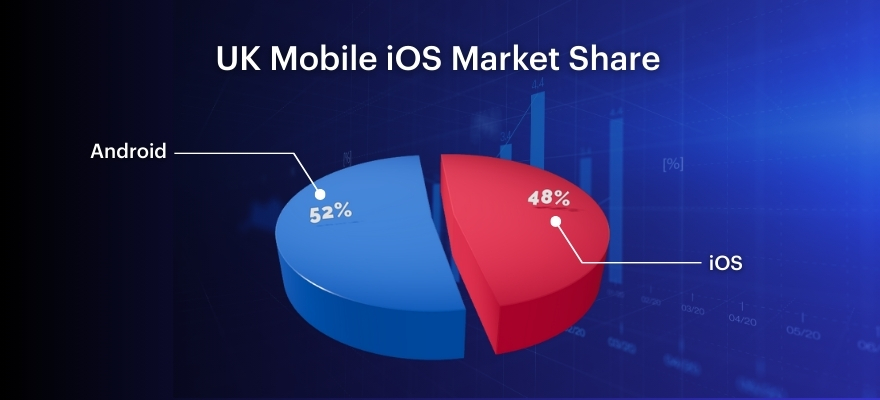
    When developing for the UK, where iOS and Android share a relatively balanced market split (with a slight lean toward iOS for high-spending demographics), a hybrid approach is often the most cost-effective and scalable strategy.

    Why React Native is the Gold Standard for 2026

    React Native allows developers to build high-performance mobile applications using JavaScript, rendering with native UI components. For a social commerce app, speed is everything.

    • Code Reusability: Share up to 90% of code between iOS and Android, drastically reducing the cost of app development in the UK.
    • Native Performance: Unlike older hybrid frameworks, React Native interacts directly with native APIs, ensuring that high-definition product videos and social feeds scroll smoothly.
    • Live Updates: Push critical updates and seasonal marketing features directly to users without waiting for App Store approval cycles, essential for fast-moving UK retail events like Black Friday or Boxing Day sales.

    Technical Specification: The React Native Stack

    • Speciality: Cross-platform mobile development with near-native performance.
    • Key Features: Hot reloading, vast ecosystem of libraries (like Reanimated for smooth UI transitions), and robust community support.
    • Best For: Startups and enterprises looking to scale quickly across both major platforms.

    For a deeper dive into why this matters, check our guide on cross-platform app development.


    Core Features for the British Consumer

    To succeed in the UK, your application must go beyond a simple “Buy” button. It needs to integrate seamlessly into the lifestyle of the British consumer.

    1. Frictionless UK Payment Integration

    UK consumers are highly sensitive to payment security and speed. Your app should support:

    • Apple Pay & Google Pay: Non-negotiable for reducing checkout friction.
    • Open Banking (Pay by Bank): Increasingly popular in the UK for its security and lower merchant fees.
    • Buy Now, Pay Later (BNPL): Integration with services like Klarna or Clearpay is essential for the 18–34 demographic.

    2. AI-Powered Personal Shopping Assistants

    Nearly 20% of UK shoppers now expect AI-driven help.

    • Feature: Integrated chatbots that suggest products based on social interaction history.
    • Implementation: Using GPT-4o or similar LLMs to parse user intent and provide real-time style advice.
    • Benefit: Increases average order value (AOV) by up to 25%.

    3. Visual Search and Image Recognition

    With the rise of “see it, want it” culture, image search tools allow users to upload a photo of an item they saw on the street and find a match in your marketplace. This is a top priority for over 25% of UK social buyers.

    4. Live Stream Shopping & Social Proof

    Integration of live-streaming capabilities allows influencers to showcase products in real-time. Coupled with real-time “Social Proof” notifications (e.g., “5 people in Manchester just bought this”), this drives the impulse purchase behavior prevalent in the UK market.


    Architecture for Scalability and Speed

    A high-performing app is only as good as its backend. For social commerce, where traffic can spike 10x in minutes due to a viral post, a robust architecture is vital.

    Event-Driven Microservices

    We recommend an event-driven architecture to handle the complex interactions between social feeds, inventory management, and payment processing.

    Component Technology Recommendation Why?
    Frontend React Native Cross-platform efficiency and speed.
    Backend Node.js / NestJS Excellent for handling asynchronous I/O and concurrent social interactions.
    Database PostgreSQL + Redis PostgreSQL for transactional integrity; Redis for lightning-fast caching of social feeds.
    Cloud AWS (London Region) Minimizes latency for UK users and ensures data residency compliance.
    Media Handling Cloudinary / Mux Automated optimization of product videos and images for various UK mobile networks (5G/4G).

    The Problem: Monolithic architectures crash under the weight of viral marketing campaigns.
    The Solution: Decoupling services so that a spike in “likes” doesn’t bring down your checkout system.

    Chimpare Experience Spotlight: Best of British (UK Social Commerce Platform)

    Take a look at how we developed Best of British, a UK-based high-performing social commerce platform—built to support fast-moving product discovery, community-driven shopping, and reliable checkout under real-world UK traffic patterns.

    What We Built (and Why It Worked in the UK)

    Best of British wasn’t “just another marketplace app.” It was designed to feel like social-first browsing while still operating like a modern, conversion-focused commerce engine.

    • React Native, built for speed: A single cross-platform codebase for iOS + Android that still feels native and smooth in high-scroll, video-first feeds.
    • Scalability under spikes: Architecture choices optimized for sudden traffic surges driven by drops, influencer pushes, and time-boxed campaigns.
    • Marketplace integration-ready: Structured to plug into existing commerce stacks and marketplace workflows without breaking the in-app social experience.

    The Problem: Many teams ship a nice-looking MVP, then struggle when growth introduces feed lag, checkout bottlenecks, and inventory mismatch.
    The Solution: Build social + commerce as one scalable system—React Native on the front, resilient services behind it, and integration patterns that keep data consistent end-to-end.

    How Our React Native Approach Delivered a Seamless UX

    To keep the experience lightning-fast (especially on long sessions and content-heavy browsing), we focused on performance-first mobile delivery.

    • Speciality: Cross-platform React Native engineering for commerce + social UX
    • Key Features: Smooth feed rendering, scalable navigation patterns, native-grade checkout flow, and modular feature delivery for rapid iteration
    • Best For: UK brands that need one app to serve both community engagement and direct sales without performance trade-offs

    Scalability Decisions We Prioritized from Day One

    We treated virality as a baseline requirement—not a future enhancement.

    • Speciality: Scalable app foundations that handle unpredictable demand
    • Key Features: Caching strategy for high-read feeds, resilient service boundaries to isolate failures, and infrastructure choices aligned to UK latency expectations
    • Best For: Product teams planning launches, drops, or creator-led campaigns where traffic can spike 5–10x fast

    Marketplace Integration (Without Breaking the Social Flow)

    A UK social commerce platform lives or dies by trust—if listings, stock, and order status drift out of sync, customers churn immediately.

    • Speciality: Marketplace + commerce integration patterns
    • Key Features: Real-time inventory sync, unified product catalog mapping, consistent pricing/promotions across channels, and order lifecycle alignment with fulfilment
    • Best For: Businesses extending Shopify/Magento/custom stacks into a dedicated social commerce app while keeping operational data accurate

    Want a Similar Build for Your Brand?

    If you’re building (or rebuilding) a UK-focused social commerce experience and need a team that can deliver React Native performance, scalable architecture, and marketplace integration without chaos, we can help.

    Book a free consultation with Chimpare and we’ll map the fastest path from concept to a production-ready, high-performing app.

    Integrating with Major Marketplaces

    For many UK businesses, the social commerce app is an extension of an existing e-commerce ecosystem.

    Shopify and Magento Integration

    Whether you are using Shopify with ChatGPT integration or a custom Magento build, your social app must act as a seamless window into your existing inventory.

    • Inventory Sync: Real-time synchronization is critical. There is nothing more damaging to a UK brand’s reputation than a user purchasing an “out of stock” item discovered on social media.
    • Omnichannel Reach: Ensure that loyalty points and user profiles are consistent whether the customer shops on your website, your social app, or in a physical store in London or Birmingham.

    UI/UX Design: Converting Browsers into Buyers

    The “Social” in Social Commerce means the UI should feel more like Instagram and less like Amazon. It’s about discovery, not just search.

    Design Principles for High Conversion

    • The 3-Tap Rule: A user should be able to go from discovering a product in a video to completing a checkout in no more than three taps.
    • Micro-Animations: Use subtle animations to reward social interactions (likes, shares, saves), making the app feel “alive.”
    • Localized Content: Ensure imagery and language reflect UK culture (e.g., using “Autumn/Winter collection” instead of “Fall,” and displaying prices clearly in GBP).

    The Problem: Overly complex navigation leads to “cart abandonment” on mobile devices.
    The Solution: Implementing a UI/UX design guide that prioritizes thumb-friendly navigation and “one-click” checkout pathways.


    Compliance and Security: Navigating UK Regulations

    Post-Brexit, the UK has its own set of stringent data protection and financial regulations.

    UK-GDPR and Data Privacy

    Social commerce apps collect vast amounts of personal and behavioral data.

    • Data Residency: Store UK user data within UK-based servers (e.g., AWS London) to simplify compliance.
    • Consent Management: Implement transparent, easy-to-use cookie and data tracking consents that don’t disrupt the shopping flow.

    Strong Customer Authentication (SCA)

    Under UK law, most electronic payments require SCA. Your app must support biometric authentication (FaceID/TouchID) to meet these requirements without adding significant friction to the user experience.


    Common Mistakes in Social Commerce Development

    Even the most well-funded projects can fail if they ignore the nuances of the mobile-first social experience.

    1. Ignoring Latency: UK mobile users are impatient. A delay of just 100ms in load time can drop conversions by 7%.
    2. Poor Search Functionality: If a user can’t find a product they saw in a social post via a quick search, they will leave. Use ElasticSearch or Algolia for lightning-fast results.
    3. Neglecting Post-Purchase Socializing: The journey doesn’t end at checkout. Encourage users to share their “unboxing” experience directly back into the app’s community feed.
    4. Underestimating UK Shipping Logic: UK consumers expect precise delivery windows (e.g., DPD or Royal Mail tracking). Integration with UK-specific shipping APIs is a must.

    Mobile-first UI layers showing a social commerce app interface with product feeds and checkout buttons.


    Comparison: Development Approaches for the UK Market

    Feature Custom React Native App Standard Web Wrapper Third-Party Platform (e.g., TikTok Shop Only)
    Performance High Low Medium
    Brand Control Total Limited Very Limited
    Data Ownership You own all data Limited data Platform owns the data
    User Experience Seamless/Interactive Clunky Native to platform
    Development Cost Moderate/High Low Low (Commission based)
    Scalability Unlimited Poor Moderate

    Data Insights: UK Social Commerce Growth Trends

    Below is a representation of the projected growth in social commerce spending per user in the UK from 2023 to 2027.

    • 2023: £450 per annum
    • 2024: £610 per annum
    • 2025: £820 per annum
    • 2026 (Current): £1,050 per annum
    • 2027 (Projected): £1,380 per annum

    Graph showing the upward trajectory of social commerce spending trends among UK consumers.


    The Development Roadmap: From Concept to Launch

    Building a high-performing app requires a structured approach. At Chimpare, we follow a rigorous lifecycle:

    1. Discovery & Strategy: Identifying the specific social triggers for your UK audience.
    2. UI/UX Prototyping: Designing a mobile-first experience that prioritizes discovery.
    3. MVP Development: Focusing on React Native for core features like feed integration and checkout.
    4. Testing (QA): Rigorous testing on various devices and UK network conditions.
    5. Deployment & Optimization: Launching on the App Store and Google Play with a focus on ASO (App Store Optimization).

    Addressing the Stakeholders

    • For Business Owners: A dedicated app increases customer lifetime value (CLV) by fostering a direct community.
    • For Developers: React Native offers the best balance of productivity and performance for rapid iterations.
    • For Marketing Heads: The data gathered from a custom app allows for hyper-personalized retargeting that isn’t possible through standard social ads.

    FAQ

    Q: How much does it cost to build a social commerce app in the UK?
    A: Costs vary based on complexity, but a high-performing MVP typically starts between £30,000 and £60,000. For a more detailed breakdown, see our article on app development costs.

    Q: Is React Native better than Native development for this?
    A: For most social commerce applications, yes. It allows for faster deployment on both platforms without sacrificing the performance needed for social feeds and video.

    Q: How do I handle UK-GDPR in my app?
    A: By implementing privacy-by-design, using UK-based data centers, and ensuring transparent data processing agreements are in place with any third-party AI or payment providers.

    Q: Can I integrate my existing Shopify store?
    A: Absolutely. We specialize in Shopify integrations that allow your app to pull real-time inventory and push orders directly into your existing fulfillment workflow.


    Conclusion: Adapt or Be Left Behind

    The UK retail market is no longer a “bricks and mortar vs. clicks and mortar” debate. It is a race for attention within the social ecosystem. Developing a high-performing social commerce application is a strategic investment in the future of your brand. By choosing the right tech stack (React Native), focusing on UK-specific features (Open Banking, localized UX), and ensuring robust scalability, you can transform your social presence into a high-converting sales engine.

    The future of shopping is social, interactive, and mobile. Is your business ready?

    Ready to Build the Next Big Social Commerce App?

    At Chimpare, we specialize in building cutting-edge mobile solutions that drive growth in the UK market. Whether you’re a startup looking to disrupt the industry or an established retailer modernizing your stack, our team of expert developers and designers is here to help.

    Contact Chimpare today for a free consultation and let’s turn your vision into a high-performing reality.

  • How Can You Create an Android App Step by Step Successfully? 

    How Can You Create an Android App Step by Step Successfully? 

    How Can You Create an Android App Step by Step Successfully
    [ez-toc]

    Have you ever given the process of creating the apps you use daily any thought? Like Instagram’s sophisticated camera tools, TikTok’s incredibly fluid scrolling, or even your phone’s simple notes app. Here is a brief overview of the Android app development market, which is certainly one of the most attractive and accessible technology endeavours right now.

    Android operates on the highest number of mobile devices around the globe. Running on billions of devices, Android is the leading mobile operating system in the world. These devices can be wearables, tablets, phones, TVs, and even cars. Thanks to its open architecture, developers have the freedom to build almost any kind of app, be it a simple utility or a highly complex and deep technological experience.

    Actually, learning Android development from the ground up is well within your grasp regardless of your current coding expertise, and you can even create actual apps for sale on the Google Play Store.

    Android had evolved into much more than only a vehicle for basic apps by 2026. Developers today use artificial intelligence and machine learning to provide more creative, individualised experiences. Building cross-platform solutions with frameworks that let you publish on both iOS and Android with the same code, optimising for 5G speeds, and even creating rich AR/VR capabilities are all part of their development. These technological advancements are making it easier for any artist to learn, and at the same time, changing the characteristics of the apps.

    Should you not be the best at writing code right now, have no fear. You can start developing apps right from your computer using tools such Android Studio, Google’s official IDE for Android, and programming languages like Kotlin, currently Google’s chosen Android language.

    By breaking down the entire Android app development process into digestible chunks, we hope to demystify it in this blog article. From the idea, design, coding, and testing to the Play Store launch, we are going to guide you through every step. The right equipment, a method, and a ton of fantastic advice will be taught to you, making the process simple and enjoyable.

    If you have a concept for an app you would want to create a reality, whether it’s a social network app, productivity tool, or amusement let’s build it step by step.

    Not sure where to start with Android app development?

    Plan. Build. Test. Launch. Scale.


    Book Your Free App Consultation

    How Do You Turn an App Idea into a Well-Planned Android Project?

    Like any successful Android software, a mobile app creation begins with a great idea followed by detailed planning. This phase is what leaves a simple concept behind and moves it forward as a well-structured plan with clear goals, a target audience, and a technology roadmap in the case of Android app development.

    Rather than just jumping into code, developers concentrate on knowing the issue their application is resolving, and the possible advantages consumers may derive from their daily lives. Prominent Android app development companies use this approach to ensure that every app they produce has a considerable impact in addition to being visually appealing.

    The concept is confirmed, after which market research moulds future growth. Examining comparable apps on the Google Play Store, reading user reviews, and noting flaws in current items allow developers to enhance features and bypass frequent errors.

    This technique not only helps the project to be more realistic and usable but also provides a feeling of the anticipated Android app creation expenses and dates. Whether you are doing it yourself or negotiating with an Android mobile app development business, excellent planning lowers risks and improves success chances.

    Key Steps to Plan Your Android App Effectively:

    • Clearly state the problem your program will tackle as well as the intended audience. 
    • Examine rival apps to identify trends, features, and user expectations. 
    • Figure out the main characteristics and start with MVP first. 
    • To visualise app navigation, create user flows and simple wireframes. 
    • Select the appropriate technology stack; Kotlin is the recommended language for creating Android apps. 
    • Plan backend integration using APIs and appropriate databases such as Room or SQLite. 
    • Based on app complexity and growth scale, forecast the timeline and budget. 
    • Verify the app concept via early user testing, prototypes, or input. 
    • To help developers during the development phase, get paperwork ready.

    How Can You Design a Great UI/UX for Your Android App?

    UI and UX in Android app development define a user’s initial reaction as well as their long-term usage of your app. Users first find attraction in a visually appealing design, but a carefully considered experience is what keeps them coming back.

    Successful Android app development businesses prioritise learning user needs, habits, and expectations prior to designing any screen arrangements. This method guarantees that every design decision promotes usability, clarity, and easy navigation.

    Good user interface/user experience planning helps to manage Android app development expense and lower prospective design effort as well. The development process quickens and is more efficient early on when developers carefully design user pathways, screen layouts, and interactions.  

    Before building the final product, professional Android app development services count on wireframes, prototypes, and user testing. Time spent on design always pays off, whether you are studying Android app development from the start or working with a custom Android app development firm.

    Detailed Elements of Great UI/UX Design for Android Apps:

    • Understanding your target audience’s preferences, everyday habits, and how they may interact with your app requires investigation of their interests. Knowing this, it’s simple to develop software capabilities and visual goods that consumers would perceive as intuitive and totally serve their needs.
    • Develop wireframes to arrange your app’s displays and identify button, menu, graphic, and text placement. Wireframes offer a straightforward visual plan for navigation prior to visual styling.
    • Develop a click using mockups illustrating real app usage with Figma or Adobe XD. Early-stage non-coding prototype testing and comment collection is quite helpful.
    • Following Google’s Material Design instructions helps to keep typeface, spacing, icons, animations, and design patterns consistent across several Android devices.
    • Concentrate on simplicity and clarity by staying clear of packed displays and extraneous items. User pleasure increases with regular navigation and obvious call-to-action buttons.
    • While ensuring accessibility and comfort for extended use, employ legible fonts matching your brand and visually balanced colour schemes.
    • Make sure that UI elements, animations, and graphics load smoothly and rapidly by optimising performance with lightweight design elements.


    • Scalable fonts, appropriate colour contrast, screen reader compatibility, and gesture navigation are all examples of accessible design.


    • To find unclear flows or sources of friction, test the design with actual users. Then, adjust layouts depending on feedback and actual behaviour.

    What Tools and Technologies Should You Use for Android Development?

    Choosing the correct tools and technologies when starting your Android app development journey will either make everything feel smooth and exhilarating or baffling and exhausting. The good news is that, from novices learning how to learn Android app development from scratch to major

    Android app development companies provide complicated applications. Google has built a robust development ecosystem for every level. With the proper tools, you may swiftly create superior user interfaces, write more neat code, confidently release on the Google Play Store, and test. 

    Modern Android app development services centre on efficiency, performance, and scalability; hence, today’s tools are made to simplify development while enabling sophisticated capabilities like real-time data sync, cloud integration, and AI-driven experiences. Early knowledge of the technology stack helps manage Android app development cost, whether you are working with a custom Android app development firm, an Android app development agency, or creating your first project by yourself. Early understanding also helps minimise later reworking.

    Essential Tools and Technologies for Android App Development

    Android Studio 

    Though frameworks like Espresso help in automating user interface testing, the Android Emulator allows testing on numerous device sizes and Android releases.

    Programming Language – Kotlin 

    Kotlin is presently the industry standard for Android app development and will help you choose the appropriate language. Officially backed by Google for contemporary Android apps, it is brief, safer than Java, and reduces accidents.

    Android SDK  

    The SDK offers development tools, APIs, and libraries needed to access device capabilities including background services, notifications, sensors, GPS, and camera.

    Jetpack Libraries & Jetpack Compose 

    Android Jetpack makes navigation, backdrop processing, and data handling easier. Modern UI toolkit Jetpack Compose allows developers to create dynamic interfaces with less code.

    APIs for Backend Integration 

    RESTful APIs are used to connect your app with servers for login systems, real-time data, payments, cloud storage, and notifications. This is essential for most real-world applications.

    Databases 

    Offline storage of user data is made possible by local solutions like Room Database and SQLite, hence enhancing app dependability and speed.

    Firebase & Cloud Services 

    Particularly by Android mobile app development firms creating scalable applications, Firebase is often used for real-time databases, authentication, push notifications, crash reporting, and analytics.

    Version Control  

    While GitHub organises project repositories and controls team processes, git assists in monitoring code changes and working cooperatively.

    Testing Tools & Emulators 

    Though frameworks like Espresso help in automating user interface testing, the Android Emulator allows testing on numerous device sizes and Android releases.

    Performance & Debugging Tools 

    To guarantee a seamless user experience, built-in Android profilers watch memory use, CPU performance, and network activity.

    Android app development feels overwhelming?

    Let experts build your app right


    Talk to Our Experts Now

    How Can You Set Up Android Studio for App Development?

    Many Android application development companies and agencies employ Android Studio to design premium mobile applications. The official IDE for Android app developers is Android Studio. Whether you are a newbie starting to write Android applications from the ground up or a seasoned professional partnering with an Android development business.

    A proper installation of Android Studio will give you access to great programming tools, visual layout editors, emulators, and debugging features, all of which are aimed at speeding up and making the development easier while keeping the costs of Android app production under control.


    Steps to Set Up Android Studio Successfully:


    • First of all, visit the official Android developer site and locate Android Studio. Get the v Begin with Android Studio from the official Android developer website. For best experience and performance, get a copy of the app suited for your operating system.
    • Remember to include the Android SDK to your installation. This collection of APIs, tools, and libraries enables apps to use capabilities like the camera, GPS, storage, and background services.


    • Change the SDK elements and download system images for several Android versions so that you may evaluate several devices with an emulator.
       
    • By starting a new project, select a template like Empty Activity or Basic Activity to produce an app with the needed setup and prearranged structure.


    • Choose Kotlin as your official Android development programming language at present, since it has a clear syntax and may have much lower run-time errors.
    • Compose Gradle build files automated tools meant to manage app versions, dependencies, and project settings across development and deployment.


    • Test your app on a real gadget or Android emulator to spot any performance, design, and interactivity problems.
       
    • Add some nice plugins and turn on Jetpack libraries for various purposes like creating user interfaces rapidly, managing app navigation, running background tasks, and handling databases.

    How Can You Develop the Core Features of Your Android App?

    Your Android app really comes to life and begins to solve actual client needs when you implement the necessary features. This phase of Android app development emphasises turning designs and plans into functional screens, interactive pieces, and smooth processes using Kotlin, Android SDK tools, and modern Jetpack frameworks. 

    Whether you are starting to build an Android app on your own, learning how to design one from scratch, or working with a custom Android app development firm, this step affects how your consumers interact with your app.

    Many Android app development companies focus on elegant design and scalable code, thus features run well now and continue to be simple to improve in the future, hence controlling Android app development costs over time.

    Key Steps to Build Strong Core Features:

    • Begin by developing the core app features. Take the MVP approach and only include features that will allow users to sign up, see their dashboards, and take basic actions. Then later on you can think about adding fancy features.
    • To develop clear and manageable code, use Kotlin as your programming language. In addition to improving performance and lowering bugs, it is the official language of Android.
    • When developing UI elements with Jetpack Compose or XML designs, be sure the layout is responsive to several screen sizes and device kinds.
    • For live data exchange, including user login, content refresh, cloud storage, or payment methods, employ API integration.
    • Utilising Kotlin as your programming language will help you create simple and understandable code. Apart from reducing errors and boosting performance, Android’s official language is it.
    • When building user interface elements using Jetpack Compose or XML layouts, make sure the arrangement is flexible to fit many screen sizes and device types.
    • Give performance enhancement, load time reduction, memory management, and backdrop operations reduction top priority.
    • Including error handling and validation guarantees seamless user interactions and avoids crashes.
    • Test tools usually help early identification of problems during the development process by means of real devices and emulators.

    What Are the Best Ways to Test, Debug, and Improve Android App Performance?

    The actual enchantment occurs in testing and optimisation once your programme is created. Here is where you ensure quick loads and no user crash for everything. Good testing transforms your app into something people actually like using, whether you are learning Android app development from scratch or collaborating with a professional Android app development company.

    Here are five smart ways to test and boost your Android app’s performance:

    Test on real devices and emulators 

    Run your app in Android Studio on several screen sizes and Android versions early on to identify flaws, design difficulties, and performance drops.

    Use Logcat and Android Profiler for debugging 

    Logcat helps track crashes in real time, while Android Profiler shows CPU, memory, and battery usage so you can quickly fix slow or heavy processes.

    Automate important tests 

    Tools like Espresso and JUnit make sure your core features keep working after every update, a must for any serious Android mobile app development company.

    Optimise images and background tasks 

    Compress media files and run heavy operations in the background using Coroutines or WorkManager to keep your app fast and responsive.

    Monitor real-world crashes after launch 

    Use tools like Firebase Crashlytics to catch live issues, improve stability, and reduce long-term Android app development costs.

    How Do You Launch Your Android App on the Google Play Store?

    Publishing your Android app on the Google Play Store can be considered the most exciting moment among all the phases of the entire cycle of developing an Android application because it is the point at which your work is getting in front of users in the real world. Correct distribution is the key to your application’s visibility, downloads, and trust after it has been reviewed, refined and performance-optimised.

    From creating a developer account all the way through to creating store listings that turn passersby into consumers, this phase is critical in deciding the success of your app. Knowing the Play Store launch procedures will help you to avoid the usual errors, quickly and effectively get your app live without any hold, ups or rejections, whether you are developing an Android app from scratch or are collaborating with an established Android app development company.

    Key steps to successfully launch your Android app on the Google Play Store:


    Create a Google Play Developer Account
     

    Register once as a developer and configure your profile with business information, most crucial if you are a publisher of android mobile app development business or agency. 

    Get Ready Your APK or AAB App Release Build 

    Using Android Studio, which is now Google’s preferred format for optimised delivery and better app performance, create a signed Android App Bundle (AAB). 

    Write an Optimised App Listing 

    Include a concise app title, interesting description, screenshots, a demo video, and feature highlights to enhance exposure. This is where Android app development services place a great deal of emphasis on conversions. 

    Set Content Ratings, Privacy Policy & App Category 

    Thoroughly fill out Google’s questionnaires. To avoid rejection or compliance issues, upload your privacy policy link honestly and select the appropriate app category. 

    Use Play Console Insights to publish, track, and enhance 

    Track installations, crashes, user reviews, and updates using Google Play Console after your app is released to constantly improve its user experience and expansion.

    Unsure how to build your Android app?

    Build your Android app with confidence


    Start Your Project Today

    Conclusion

    One intriguing and satisfying experience is building an Android app gradually as it mixes creativity, technical skill, and thorough preparation. Success for your app depends on every stage, from conceptualizing and setting up Android Studio to designing user-friendly interfaces, developing core features, performance testing, and ultimately launching on the Google Play Store. Following a well-organized procedure helps you to avoid typical errors and give a great mobile experience whether you elect to engage with a custom Android app creation firm or create the app yourself.

    Now is a wonderful moment to invest in Android app development services and creative app ideas as the Android ecosystem keeps expanding fast. Focusing on performance, using the appropriate tools, and paying attention to user input help you to develop apps that distinguish themselves in a cutthroat market as well as run without any problems. Learning and perseverance enable even novice developers to turn basic ideas into viable Android apps.

    FAQs


    How to create an Android app step by step?


    To create an Android app step by step, start by defining your app idea and target users, then design wireframes and UI layouts. Next, set up Android Studio, write your code using Kotlin or Java, test the app for bugs and performance issues, and finally publish it on the Google Play Store while continuing to improve it based on user feedback.  


    The seven key steps are: 

    • Validate your app idea and research the market 
    • Plan features and create a project roadmap 
    • Design the UI/UX 
    • Set up the development environment 
    • Develop core functionalities 
    • Test and optimise performance.
    • Launch the app and monitor user feedback 


    The five main steps include planning your app concept, designing the interface, developing the application, testing for quality and performance, and deploying it on app stores with regular updates. 


    Begin by identifying a problem your app will solve, then design the user experience and choose the right development tools. After building and testing the app thoroughly, publish it on the appropriate platform and keep improving it through updates and user feedback. 

    Found this post insightful? Don’t forget to share it with your network!


    Related Articles

  • What Tools Do Developers Need for Android App Development?

    What Tools Do Developers Need for Android App Development?

    What Tools Do Developers Need for Android App Development_-1
    [ez-toc]

    Building​‍​‌‍​‍‌​‍​‌‍​‍‌ an Android app was, at one time, simply a few lines of code and the immediate display of the result on a device. Nevertheless, it has grown into a detailed procedure by 2025, which entails planning, coding, UI designing, testing, and launching the app. In a situation where Android is the OS for more than 2 billion smartphones, tablets, wearables, and other smart devices globally, the users are asking for higher standards and more ​‍​‌‍​‍‌​‍​‌‍​‍‌features.

    Whatever​‍​‌‍​‍‌​‍​‌‍​‍‌ situation you might be in as a developer working on your own, a member of an in-house tech team, or collaborating with a skilled Android app development company, the instruments you pick can either positively or negatively influence your project. An​‍​‌‍​‍‌​‍​‌‍​‍‌ apt assemblage of Android programming instruments empowers developers to work efficiently, be less prone to errors, improve the app performance, and deliver a consistent user experience for different screen sizes and Android ​‍​‌‍​‍‌​‍​‌‍​‍‌versions.

    Given the array of tools from Android Studio to prototyping, testing, debugging, and backend services, contemporary Android mobile development is dependent on a harmonious set of tools rather than a monolithic ​‍​‌‍​‍‌​‍​‌‍​‍‌solution. This is especially important for businesses offering Android app development services or custom Android app development services, where speed, scalability, and quality directly impact client satisfaction.

    Here,​‍​‌‍​‍‌​‍​‌‍​‍‌ we explain the necessary developer tools for creating an Android application in a way that is straightforward and practical. If you are a newbie and have no idea, or you are simply curious about how a professional Android app development agency works to build a sturdy mobile app development, after reading this guide, you will know which tools are important, what the purpose of using them is, and how they relate to the general Android development ​‍​‌‍​‍‌​‍​‌‍​‍‌process.

    Too many Android tools create confusion and slow development.

    Simplify Android tool selection


    Book Your Free App Consultation

    What is Android App Development?

    Android​‍​‌‍​‍‌​‍​‌‍​‍‌ app development basically means the writing of programs that can work on Android devices. But the devices are not only limited to smartphones and tablets, but they also include smart TVs, smartwatches, in-car systems, and even IoT devices. Simply stating, it is the app creation process that results in a product which is functional and user-friendly, which can be downloaded and used on Android devices by ​‍​‌‍​‍‌​‍​‌‍​‍‌people.

    The​‍​‌‍​‍‌​‍​‌‍​‍‌ developer team is the one who usually decides the function and the target users of the app first. After that, developers, through coding in languages like Kotlin or Java, will build the software, make the UI which is in line with Android’s Material Design standards, and, if it is required, they will link the app to databases, APIs, or cloud services.

    After the features have been made, the application is tested on different devices and various Android versions to check its stability, and thus, it is uploaded to the Google Play Store.

    A modern Android app development environment is primarily characterised by a comprehensive set of tools that are available to support each step of the ​‍​‌‍​‍‌​‍​‌‍​‍‌procedure. Developers are able to build apps more quickly, lessen mistakes, and keep up a consistent level of performance thanks to the tools that range from the official ones, such as Android Studio for coding and debugging, to emulators for testing and backend platforms for data handling.

    This is the reason why the top-tier engineering teams in an Android app development company or providing Android app development services are very much dependent on the appropriate toolset as opposed to manual ​‍​‌‍​‍‌​‍​‌‍​‍‌methods.

    For​‍​‌‍​‍‌​‍​‌‍​‍‌ enterprises that require personalised Android app development services, developing an Android application is essentially a software task involving the creation of scalable, secure, and user-friendly mobile solutions.

    An​‍​‌‍​‍‌​‍​‌‍​‍‌ experienced Android app development company uses dependable tools and adheres to ideal working methods to ensure that the apps delight the users, remain compatible with future updates, and, thus, make a real profit in the highly competitive mobile ​‍​‌‍​‍‌​‍​‌‍​‍‌​‍​‌‍​‍‌​‍​‌‍​‍‌market.

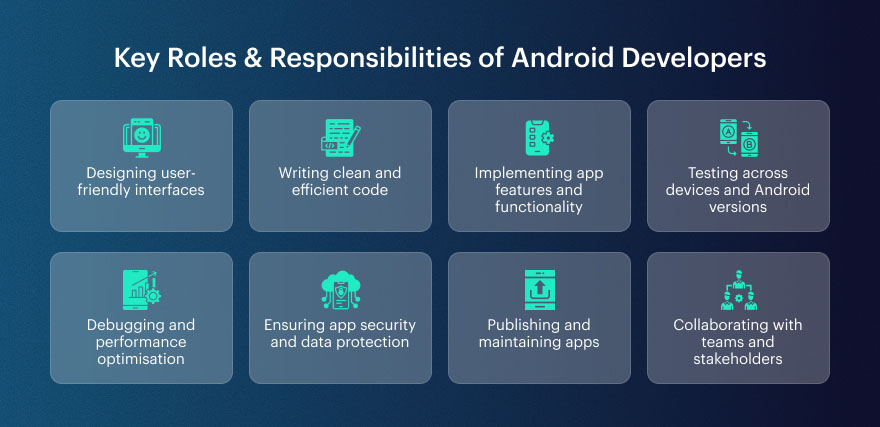
    What are the Key Roles & Responsibilities of Android Developers?

    Key Roles & Responsibilities of Android Developers

    Before​‍​‌‍​‍‌​‍​‌‍​‍‌​‍​‌‍​‍‌​‍​‌‍​‍‌ analysing the tools utilised in the development of an Android app, it is worth figuring out what an Android developer does daily.  As they see, it’s not just coding; they are the ones who are responsible for building the whole app journey, starting from the very first user interface to the app’s working over time after the release.

    Developers​‍​‌‍​‍‌​‍​‌‍​‍‌ are essentially the ones who make the idea of a safe and user-friendly mobile app come true; hence, they can be regarded as the core power of the mobile industry. A​‍​‌‍​‍‌​‍​‌‍​‍‌ developer, solo or in a team of an Android app development company, doesn’t cause any change.

    What are the major jobs and the main responsibilities of Android developers? The answer is provided here with the aid of straightforward ​‍​‌‍​‍‌​‍​‌‍​‍‌language:

    Designing user-friendly interfaces

    In general, Android developers and designers work hand in hand to build intuitive experiences that follow Material Design standards. The main objective is to make the app nice-looking and usable for different screen sizes and Android devices.

    Writing clean and efficient code

    Programmers use languages like Kotlin or Java to build software which is logically structured, clear, and can be maintained with minimal ​‍​‌‍​‍‌​‍​‌‍​‍‌work. In this way, the applications become efficient, and the developers will have an easy time making updates later on, especially if they are a team providing long-term Android app development ​‍​‌‍​‍‌​‍​‌‍​‍‌services.

    Implementing app features and functionality

    From login systems and push notifications to maps, payments, and APIs, developers build and integrate core features that bring the app’s purpose to life.

    Testing across devices and Android versions

    Android​‍​‌‍​‍‌​‍​‌‍​‍‌ apps have to be compatible with different devices and various OS versions, hence testing is done on the real devices as well as emulators.

    Debugging and performance optimisation

    Bug locating, crashes fixing, app speeding up, these are the continuous activities of the developers. To optimise the app memory, battery, and loading time, developers use debugging and profiling tools.

    Ensuring app security and data protection

    As part of good practice, developers take measures to secure user data, handle permissions correctly, and ensure that their app is free from any security loopholes, which are among the most important aspects of a custom Android app development service focused on.

    Publishing and maintaining apps

    Once​‍​‌‍​‍‌​‍​‌‍​‍‌ the application is prepared, developers take care of Play Store updates, bug fixes, and adding new features according to user feedback.

    Collaborating with teams and stakeholders

    Likewise, in an Android app development company, developers usually collaborate tightly with designers, testers, project managers, and clients to confirm that the app satisfies the technical and business objectives established.

    The best Android developers blend creative thinking with solid technical skills. Knowing their duties in-depth, one can easily understand the necessity of the right tools for the fast and efficient production of top-notch Android apps on a ​‍​‌‍​‍‌​‍​‌‍​‍‌large-scale.

    What are the Core Android App Development Languages?

    Every​‍​‌‍​‍‌​‍​‌‍​‍‌ Android app basically runs on the programming language that was used to create it. The selection of the appropriate language is a significant factor determining the speed of app development, the ease of its maintenance, and the app’s performance in the long run. Essentially, the developers of contemporary Android applications utilise three principal languages which together cover the entire Android environment.

    Below is a concise explanation of the main languages for Android app development that are being employed ​‍​‌‍​‍‌​‍​‌‍​‍‌nowadays:

    Kotlin

    Kotlin

    Kotlin​‍​‌‍​‍‌​‍​‌‍​‍‌ is the language that Google officially recommends for Android development, and that is why it has been the main choice of developers and teams of an Android app development company. The language comes with a neat and short syntax, which allows developers to do less coding for the same ​‍​‌‍​‍‌​‍​‌‍​‍‌result. By far the most attractive feature of Kotlin is null safety, which is the main source of well-known runtime errors, which is why it is very helpful in increasing the app’s stability. Moreover, it is compatible with the present Java code without any issues; therefore, it is great for both newly built apps and those that are being ​‍​‌‍​‍‌​‍​‌‍​‍‌updated. 

    Java

    Java

    Java has been the backbone of Android app development since the platform’s early days. Java​‍​‌‍​‍‌​‍​‌‍​‍‌ is still extensively used and is a language fully compatible with Android, even though Kotlin is the language of choice for new projects. A significant number of apps, libraries, and frameworks have been developed using Java; it is a worthwhile language for developers who are tasked with the maintenance and upgrading of these. If a company provides Android app development as a service over a period of time, then the proficiency in Java will still be of great use as a result of its reliability and the big community of ​‍​‌‍​‍‌​‍​‌‍​‍‌developers. 

    Dart

    Dart

    Dart​‍​‌‍​‍‌​‍​‌‍​‍‌​‍​‌‍​‍‌​‍​‌‍​‍‌ is, by and large, known as the programming language of the Flutter library, which is a cross-platform development framework launched by Google. Flutter enables developers to write a single code that can work on both Android and iOS platforms, and thus, this is the main reason the device is a favourite tool among the teams that are engaged in delivering custom Android app development services on a shorter timeline. Dart​‍​‌‍​‍‌​‍​‌‍​‍‌ has an easy-to-understand syntax, is very efficient, and makes UI development quicker, which is why a large number of modern Android app development companies are choosing it for their multiplatform projects.

    Basically,​‍​‌‍​‍‌​‍​‌‍​‍‌ Kotlin is the go-to language for Android native development, while Java is used for legacy and enterprise systems, and Dart is the language that offers cross-platform flexibility. Developers who know the perfect moment and way of using each language can work with the proper instruments to create Android apps that have a great scale of performance and can be easily refreshed in the ​‍​‌‍​‍‌​‍​‌‍​‍‌​‍​‌‍​‍‌​‍​‌‍​‍‌coming.

    Poor tool choices increase Android development costs.

    Optimize your Android toolkit


    Speak with our team.

    What are the Essential Android App Development Tools?

    Building​‍​‌‍​‍‌​‍​‌‍​‍‌ an Android app that performs well and looks good is not just about coding, but also about using the right tools at each stage of the process, i.e., the design, development, testing, and deployment stages.

    Since Android is continuously evolving to various devices and OS versions, a developer with the proper set of tools can do their work efficiently, and their app will be less prone to ​‍​‌‍​‍‌​‍​‌‍​‍‌crashes.

    If you are a single developer or a member of an Android app development company, modern Android app development services cannot do without IDEs, UI tools, backend platforms, and mobile app testing solutions that help in building secure, scalable, and user-friendly applications.

    IDE & Essential Development Tools:

    Android Studio:

    Android​‍​‌‍​‍‌​‍​‌‍​‍‌ Studio is the official IDE for the development of Android applications and the primary tool for almost every professional Android app development company. It​‍​‌‍​‍‌​‍​‌‍​‍‌ basically consolidates all the tools a developer might require in one place, along with a code editor, a visual layout editor, an emulator, a debugger, and a performance profiler.

    The IDE, which is solely for Android, was created with and supports both Kotlin and Java. It doesn’t fully support the Android SDK and uses Gradle for development automation. The smart code completion, error detection, and testing facilities of Android Studio allow developers to build robust and scalable apps in a shorter ​‍​‌‍​‍‌​‍​‌‍​‍‌time.

    IntelliJ IDEA:

    IntelliJ​‍​‌‍​‍‌​‍​‌‍​‍‌ IDEA is a feature-rich IDE created by JetBrains and is the core upon which Android Studio is built. A lot of developers choose IntelliJ IDEA because it has superior code navigation, refactoring tools, and a wide range of features that enhance the developer’s productivity.

    Even though it doesn’t come as an Android-specific tool out of the box, it can support Android development through plugins and is a great performer for big projects. Generally, a team of professionals providing a long-term service of Android app development will be found using IntelliJ IDEA as a tool to efficiently manage a complex codebase in conjunction with Android ​‍​‌‍​‍‌​‍​‌‍​‍‌Studio.

    Visual Studio / Xamarin:

    Developers​‍​‌‍​‍‌​‍​‌‍​‍‌ can use Visual Studio along with Xamarin to create Android apps in C# rather than using Kotlin or Java. In particular, this device is a great asset for teams that provide custom Android app development services and have to meet the requirement of cross-platform compatibility.

    With the help of Xamarin, code can be shared among Android, iOS, and Windows apps, and at the same time, the apps can continue to use the native APIs. Visual Studio makes an excellent debugging environment, offers support for testing, and is very smoothly integrated with cloud services, thus being a viable solution for mobile development at the enterprise ​‍​‌‍​‍‌​‍​‌‍​‍‌level.

    UI & Design Tools:

    Jetpack Compose:

    Jetpack​‍​‌‍​‍‌​‍​‌‍​‍‌ Compose is the latest Android UI framework that makes UI development very easy. The developers are free from the use of XML layouts; rather, they can use Kotlin code to build UI components. This is a declarative manner, which is quite efficient because it is faster, the code is neater, and it is simple to ​‍​‌‍​‍‌​‍​‌‍​‍‌update.

    Jetpack Compose is updating the UI instantaneously when the data is changed; there are fewer bugs and less boilerplate ​‍​‌‍​‍‌​‍​‌‍​‍‌code. The majority of modern Android app development companies have embraced Compose as their preferred tool since it allows them to complete the work in less time while still producing a good-looking, highly responsive user ​‍​‌‍​‍‌​‍​‌‍​‍‌interface.

    XML and Material Design Guidelines:

    For​‍​‌‍​‍‌​‍​‌‍​‍‌ many years, XML was the main tool for designing the layouts of Android apps, essentially dictating the appearance and behaviour of different screens. These designs, when taken in conjunction with Google’s Material Design principles, XML aids developers in making interfaces that not only look good but are also consistent, accessible, and user-friendly.

    Material Design offers standardised components, colour systems, and interaction patterns that make the app more user-friendly. XML is still very much in use, i.e. in the case of local Android app development projects and big enterprise apps, despite the existence of newer technologies like Jetpack ​‍​‌‍​‍‌​‍​‌‍​‍‌Compose.

    Backend & Cloud Tools:

    Firebase:

    Firebase​‍​‌‍​‍‌​‍​‌‍​‍‌ is a Google backend platform that makes server-side development less complicated. It​‍​‌‍​‍‌​‍​‌‍​‍‌ offers many services such as authentication, real-time databases, cloud storage, analytics, and push notifications. If developers want a secure and efficient way of managing data, they might opt for Firebase instead of building backend systems from ​‍​‌‍​‍‌​‍​‌‍​‍‌scratch.

    The reason why Firebase is the go-to platform for mobile app development outsourcing companies is that it not only enables quick app development but also offers easy integration with Android apps besides automatic ​‍​‌‍​‍‌​‍​‌‍​‍‌scaling. 

    REST APIs & Backend Integration:

    REST​‍​‌‍​‍‌​‍​‌‍​‍‌ APIs are what make it possible for Android apps to talk to servers, databases, and other services that are not part of the app. Just by connecting with an API, an app can download data, carry out a payment, verify a user, or even update information at the very same time.

    To keep the communication as light and quick as possible, devs are mostly on the lookout for HTTP-based APIs with JSON as a response format. Without the right backend integration, it is almost impossible to have a fully-featured app, a situation that is of most concern to businesses that offer custom Android app development services and are dependent on real-time ​‍​‌‍​‍‌​‍​‌‍​‍‌data.

    Build & Automation Tools:

    Gradle Build System:

    Gradle​‍​‌‍​‍‌​‍​‌‍​‍‌ is the chief build automation tool that is primarily used in Android. Along with managing dependencies, it also performs code compilation, starts the tests, and creates APK or AAB files for the app’s ​‍​‌‍​‍‌​‍​‌‍​‍‌distribution. Gradle is a tool developers can use to configure different build variants, manage app flavours, and automate their repetitive ​‍​‌‍​‍‌​‍​‌‍​‍‌work. In the case of any professional Android app development company, Gradle is indispensable for keeping builds clean and making sure that app releases remain stable across different ​‍​‌‍​‍‌​‍​‌‍​‍‌environments. 

    CI/CD Tools: 

    Continuous​‍​‌‍​‍‌​‍​‌‍​‍‌​‍​‌‍​‍‌​‍​‌‍​‍‌ Integration and Continuous Deployment (CI/CD) tools such as Jenkins and Bitrise are the means by which tests and the delivery of apps are automated. The tools ensure that apps are built and tested automatically for every code change, thereby minimizing the possibility of errors and making the ​‍​‌‍​‍‌​‍​‌‍​‍‌releases faster. ​‍​‌‍​‍‌​‍The use of CI/CD pipelines is mandatory for teams operating in an Android app development agency environment, as they are the means through which code quality, quicker feedback, and more efficient deployment cycles are ​‍​‌‍​‍‌​‍​‌‍​‍‌maintained.

    Using outdated Android tools affects app performance.

    Upgrade to modern Android tools


    Book your consultation now

    Libraries & Frameworks:

    Retrofit:

    Retrofit​‍​‌‍​‍‌​‍​‌‍​‍‌​‍​‌‍​‍‌​‍​‌‍​‍‌ is one of the best networking libraries for Android applications that are used to handle API communication. One can easily make HTTP requests by using Retrofit, and the JSON responses can be very simply converted into Java or Kotlin ​‍​‌‍​‍‌​‍​‌‍​‍‌objects.

    The library is pretty minimal and efficient in its operation, and can be used without any problem with REST APIs. Its popularity in the modern Android app development community is because it takes less code and makes the network more ​‍​‌‍​‍‌​‍​‌‍​‍‌stable.

    Glide & Coil: 

    Glide​‍​‌‍​‍‌​‍​‌‍​‍‌ and Coil are image loading libraries that are usually employed for the efficient display and caching of images in Android apps. The main purpose of these libraries is to ensure that the memory is not heavily loaded, the images are loaded quickly, and the scrolling is done smoothly.

    Coil is essentially a Kotlin library, and thus, it has the best compatibility with the latest Android ​‍​‌‍​‍‌​‍​‌‍​‍‌architectures. On the other hand, Glide is famous for its strength and adaptability. Basically, these two instruments are a must for any Android app that is loaded with images or other types of media ​‍​‌‍​‍‌​‍​‌‍​‍‌content.

    Testing & Emulator Tools:

    Android Emulator:

    The​‍​‌‍​‍‌​‍​‌‍​‍‌ Android Emulator is basically how developers can test their applications on virtual devices without the need for real hardware. They can even simulate different screen sizes, Android versions, and hardware configurations with this tool. It is an indispensable instrument in the process of app development in the Android environment for the development of cross-compatible and high-performance ​‍​‌‍​‍‌​‍​‌‍​‍‌apps. 

    Genymotion:

    Genymotion​‍​‌‍​‍‌​‍​‌‍​‍‌ is an Android Emulator or platform that can be described as an external source, which is mainly used for advanced and fast testing of Android applications. Some of its features include multiple device profiles and cloud-based testing, which leads to a great testing environment for professionals. The major part of the Android app development companies have adopted the use of Genymotion in their QA process so as to quicken the tests and to be sure of the app behavior ​‍​‌‍​‍‌​‍​‌‍​‍‌consistency. 

    Espresso & UI Testing:

    Espresso​‍​‌‍​‍‌​‍​‌‍​‍‌ is the UI testing framework which is part of the Android development suite and is the main tool to simulate user interactions and check app behaviour automatically. So if any button, form, or navigation flow is malfunctioning, Espresso will catch it.

    The usage of automated UI testing is a major factor that leads to app stability, and thus, the number of bugs is drastically reduced in the pre-release stage, which is the reason why this tool is indispensable for development teams that put great emphasis on their product’s ​‍​‌‍​‍‌​‍​‌‍​‍‌quality. 

    Version Control & Collaboration:

    Git & GitHub GitLab:

    Git​‍​‌‍​‍‌​‍​‌‍​‍‌ is the software that records changes to files and allows multiple developers to work on the same files simultaneously. Services such as GitHub or GitLab offer the means for groups to govern repositories, do code review, and execute releases. Using version control is at the core of any Android app development agency, where it guarantees the safety of the code, teamwork, and its viability over ​‍​‌‍​‍‌​‍​‌‍​‍‌time.

    Debugging & Performance Tools:

    Android Debug Bridge (ADB):

    ADB is mainly a command-line tool through which developers give instructions to an Android device. Its functionalities include app installation, recording logs, debugging and device management. The use of ADB is highly essential when a developer is in the process of creating an app or fixing bugs on the ​‍​‌‍​‍‌​‍​‌‍​‍‌app.

    Profiler Tools:

    The​‍​‌‍​‍‌​‍​‌‍​‍‌ profiling instruments of Android Studio are the proper means by which developers keep track of CPU usage, memory consumption, and network activity. Such knowledge is a great help in performance optimisation, crash saving, and battery saving, which are the main things that good Android apps ​‍​‌‍​‍‌​‍​‌‍​‍‌require.

    Cross-Platform Development Tools:

    Flutter:

    Flutter by Google is a cross-platform framework that enables developers to create both iOS and Android apps using a single codebase. The language is ​‍​‌‍​‍‌​‍​‌‍​‍‌Dart. The framework provides quick development cycles and near-native performance. Flutter has become a popular choice among the providers of Android app development services who want to reach multiple ​‍​‌‍​‍‌​‍​‌‍​‍‌platforms. 

    React Native:

    React​‍​‌‍​‍‌​‍​‌‍​‍‌ Native is often a go-to tool among programmers when it comes to developing Android applications using JavaScript and React. The advantage of this technology is that it allows a single codebase to be shared between different platforms, yet the application can deliver a performance that is very close to that of a native app. In order to halve the development time and the money needed, many startups and companies have decided to use React ​‍​‌‍​‍‌​‍​‌‍​‍‌Native Development.

    Prototyping & UX Tools:

    Figma:

    Figma​‍​‌‍​‍‌​‍​‌‍​‍‌​‍​‌‍​‍‌​‍​‌‍​‍‌ is a web-based design tool that primarily focuses on UI/UX design and prototyping. As both designers and developers can collaborate simultaneously, the handoff time that is usually used for the transfer between design and development is therefore ​‍​‌‍​‍‌​‍​‌‍​‍‌saved. Figma has become a major instrument in the process of modern Android ​‍​‌‍​‍‌​‍​‌‍​‍‌app.

    Adobe XD / Sketch:

    Adobe​‍​‌‍​‍‌​‍​‌‍​‍‌ XD and Sketch are design and prototyping tools that assist in making wireframes and creating the interaction of the design. They provide the visual representation of the app layout, which is the core idea before the real development, hence the changes are less and the clarity of the design is ​‍​‌‍​‍‌​‍​‌‍​‍‌more.

    Security, Monitoring & Crash Reporting:

    Instabug / Crashlytics:

    Instabug​‍​‌‍​‍‌​‍​‌‍​‍‌ and Firebase Crashlytics are two platforms that help in the tracking of crashes, bugs, and user feedback in applications that are already live. Both these tools give developers a very comprehensive view of the errors and also a performance overview, which is why the techies can work on the fixes at great speed and consequently their app becomes more stable after the ​‍​‌‍​‍‌​‍​‌‍​‍‌release.

    What are the Best Practices for Choosing the Right Tools?

    One​‍​‌‍​‍‌​‍​‌‍​‍‌​‍​‌‍​‍‌​‍​‌‍​‍‌ of the main points in the procedure of making an Android application is the choice of the correct tools. If you are confronted with a great number of tools, it is wise to pick those which are the most appropriate for your project and team, instead of trying to use every single tool that is available.

    In any case, whether you are creating an app internally or using a skilled Android app development company, it is a basic best practice that will help you steer clear of unnecessary troubles and ensure that the development process will be more ​‍​‌‍​‍‌​‍​‌‍​‍‌​‍​‌‍​‍‌​‍​‌‍​‍‌​‍​‌‍​‍‌​‍​‌​‍​‍‌relaxing.

    Start with your project requirements

    The​‍​‌‍​‍‌​‍​‌‍​‍‌ initial step is to know precisely what you intend to build. Normally, natively developed Android applications will be able to leverage the benefits through the use of tools like Android Studio, Kotlin, and Jetpack Compose, while cross-platform projects may be more suitably created with Flutter development or React Native. Choosing tools that align with the goals, performance criteria, and target devices of your app is pretty much like making a decision that will spare you the trouble of having to redo your work ​‍​‌‍​‍‌​‍​‌‍​‍‌later.

    Consider your team’s skills and experience

    Tools​‍​‌‍​‍‌​‍​‌‍​‍‌ by themselves are only powerful until your team is proficient in using them. An Android app development agency usually decides on the tools depending on the developers’ knowledge of certain languages and frameworks. For​‍​‌‍​‍‌​‍​‌‍​‍‌ instance, a team experienced in Kotlin could decide to go for native tools, while a team good at JavaScript might opt for cross-platform tools.

    Look for strong community and long-term support

    Tools​‍​‌‍​‍‌​‍​‌‍​‍‌ that are popular with an active community, frequent updates, and good documentation are more friendly and easier to maintain. The importance of this factor is even more crucial for companies providing Android app development services for a long time, as features supported by community tools highly minimise the risks of bugs, security issues, and ​‍​‌‍​‍‌​‍​‌‍​‍‌compatibility.

    Focus on scalability and maintenance

    The​‍​‌‍​‍‌​‍​‌‍​‍‌ appropriate tools must be able to back up the expansion that is planned for the application, updates, and new features. In the case of companies that offer customised Android app development services, scalable tools are a way to keep the app not only stable but also it can be easily upgraded with the increase of users’ ​‍​‌‍​‍‌​‍​‌‍​‍‌requirements.

    In this way, developers are able to construct Android applications in a more effective manner and at the same time deliver higher performance and a better user experience by justifying the use of tools with the requirements of the project, the proficiency of the team, and the objectives that extend beyond the immediate ​‍​‌‍​‍‌​‍​‌‍​‍‌term.

    Conclusion

    Android​‍​‌‍​‍‌​‍​‌‍​‍‌ app development is today quick, clever, and adaptable to a great extent but only if the right tools are used properly. Developers​‍​‌‍​‍‌​‍​‌‍​‍‌ just can’t picture their coding without a mighty IDE and contemporary UI frameworks.

    Their toolchain is made complete with testing, automation, and performance tools, and every tool is a main character in the overall stability and user-friendliness of an app. Developers​‍​‌‍​‍‌​‍​‌‍​‍‌ have figured out how to reduce errors, speed up their work, and provide the same services to users from all devices by just having the right tools combination.

    If you were a solo developer or working with a trusted Android app development company, it would be very important to you to be constantly updated with the changing tools and best practices. A modern Android app development service is not only about app building but also includes considerations such as scalability, security, and being ​‍​‌‍​‍‌​‍​‌‍​‍‌future-ready.

    Any Android app development agency, by simply investing in the right tools and using them effectively, will be able to convert ideas into high-performing mobile applications which will be really noticeable in today’s competitive app ​‍​‌‍​‍‌​‍​‌‍​‍‌ecosystem.

    FAQs


    What tools are essential for Android app development?


    Android developers make use of various tools and technologies to develop, test, and release apps in a time-efficient manner. The tools include Android Studio, Kotlin or Java, Gradle, Firebase, emulators, and a testing tool like Espresso.


    Though not mandatory, Android Studio is the official IDE and is highly recommended as it delivers the integrated instruments for coding, debugging, testing, and performance optimisation.


    Because of its concise syntax and safety features, Kotlin will be the primary programming language for Android development in the future, but Java is still quite popular and supported.


    Indeed, tools such as Flutter and React Native are great when you want to build Android and iOS apps from one codebase, thereby saving time and development effort.


    Development tools are used for the purposes of automating testing, bug detection at an early stage, performance optimisation, and making sure apps run smoothly on various devices and Android ​‍​‌‍​‍‌​‍​‌‍​‍‌​‍​‌‍​‍‌​‍​‌‍​‍‌versions.

    Found this post insightful? Don’t forget to share it with your network!


    Related Articles

  • iOS vs Android App Development: What’s Best for UK Startups?

    iOS vs Android App Development: What’s Best for UK Startups?

    iOS vs Android App Development: What’s Best for UK Startups?
    [ez-toc]

    Introduction – Why UK Startups Must Pick the Right App Platform

    Smartphones are part of our daily lives. For this reason, creating a mobile application can be a very advantageous first step for new businesses. One of the first significant choices that UK startups face in iOS vs Android app development is deciding which platform to prioritize. This decision may affect the number of users you reach and the long-term expansion of your company. Because each platform in the iOS  and Android app development debate comes with its own set of tools, technologies, and costs, it is best to take your time choosing the one that best meets your needs.

    iOS and Android App Development: Key Differences

    iOS and Android function differently in terms of app development. iOS apps are developed in Swift or Objective-C using Apple’s Xcode environment.  Conversely, Android Studio and Java or Kotlin are used to create Android apps. Despite its reputation for strong security and a smooth, intuitive interface, iOS is often seen as more restrictive.

    Comparing Development Costs – iOS vs Android

    Cost matters to every startup. Developing an iOS app usually costs more than creating an Android version. But Android needs extra testing as it runs on different devices, which can increase total cost. Startups can go for cross platform development for cost effective solutions.

    Comparing Development Costs – iOS vs Android​

    Source: StatCounter

    Time to Launch and App Store Rules

    How fast you can launch matters. Apple’s review and approval process can take longer, potentially delaying your launch. Google Play is more user-friendly and quicker. For UK startups looking to develop their app quickly, Android is a good option. Still, Apple’s reviews often lead to better app quality.

    Making Money – Which Platform Earns More?

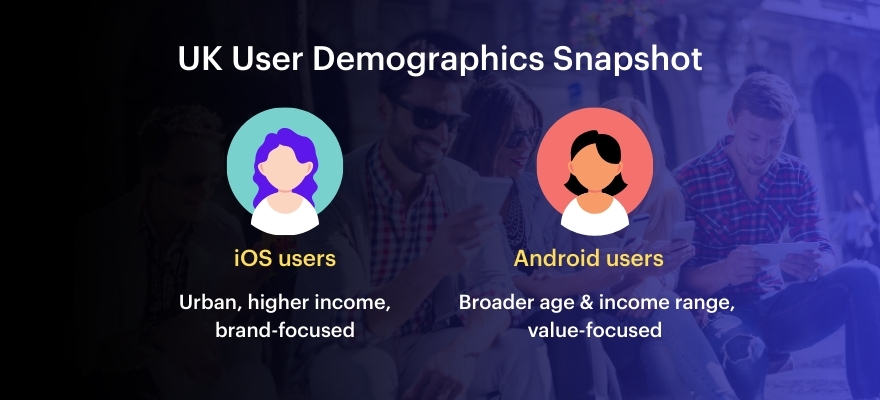
    iOS users are more likely to pay for apps or buy extras in them. This means iOS can be better for startups that sell things inside the app. Android apps often achieve higher download numbers and offer stronger ad monetization options. UK startups should pick a platform that fits their money-making plan. For instance, a subscription app might perform better on iOS, but a freemium app might perform better on Android.

    Ready to build your app?

    Let our UK-based experts guide you in choosing the right platform. Get a free consultation today.


    Book a Appointment

    Design and User Experience Differences

    iOS apps usually look more polished and follow Apple’s strict design rules. Android apps follow Google’s design system, which allows more creativity but can be less consistent. UK startups that want a high-end look might choose iOS. Android is better for those who want a custom or creative design.

    Security and Privacy – What UK Startups Should Know

    Security is very important, especially with rules like GDPR in the UK. Apple’s system is more secure as a result of careful review and closure. Android is more open and flexible, which can give developers more control over security—but it also requires careful management to avoid potential risks. Startups that deal with private data might find iOS development to be the safer choice.

    iOS or Android — or maybe both?

    Talk to our experts and find the right fit for your startup. Start the conversation.


    Contact us

    Device Fragmentation and Testing

    Google’s methodology is used in the design of Android apps that work across multiple devices. Android phones come in all sorts of screen sizes and run different software versions. 

     This requires more time and cost. iPhones use only a few models, so testing is faster and easier. 

     UK startups looking for a smoother testing process may prefer developing iOS.

    Using Cross-Platform Development Tools

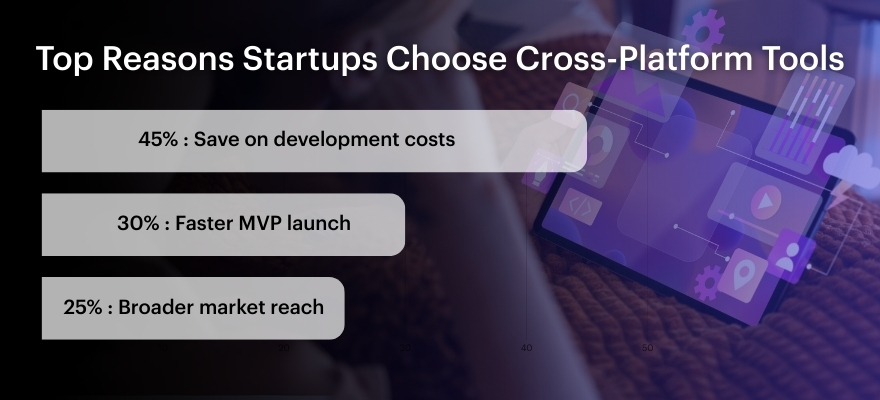
    You can create a single iOS and Android app using the React Native, Flutter, and Xamarin tools. This saves time and money. The app might not run as fast as native apps, but it’s good enough to test ideas. Later, startups can build separate apps if needed.

    Using Cross-Platform Development Tools​

    Source: Statista & Developer Economics

    What UK Startups Are Doing

    Many UK startups launch their app on iOS first to reach paying users. For example, Monzo started with iOS, then added Android. Others, like Deliveroo, used cross-platform tools to reach both groups at once. These choices depend on their business goals. New startups should think about their audience and follow what works best for them.

    Source: Deloitte Mobile Consumer Survey UK

    Source: Deloitte Mobile Consumer Survey UK

    Final Thoughts – What’s Best for UK Startups?

    Selecting platform depends following factors

    • Who your customers are
    • How you want to make money
    • Your budget
    • How fast you need to launch
    • How important security is

    iOS might be a better option for your startup if you want to provide an excellent user experience and increase revenue.

    If you want to reach more people and keep costs low, Android is better. If you’re just testing an idea, cross-platform development may be the best way to start.

    Still unsure which platform is right for you?

    Talk to our team and get personalized advice for your startup. Contact us now.


    Book a Appointment

    FAQs


    1. Which platform is cheaper for UK startups?


    Android apps usually cost less at first, but testing can cost more.

    Indeed, iOS apps usually make more money from in-app purchases and subscriptions.


    Yes. It helps startups build apps faster and cheaper using one codebase.


    iOS development is often faster since there are fewer devices and system versions to support.


    App maintenance is made simpler by iOS devices’ faster and more frequent updates. Device manufacturers are in charge of Android updates, which can cause delays.


    Yes, but the app might need to have some parts rebuilt. These expenses can be decreased by anticipating future growth from the outset.


    Not all the time. Many startups test their ideas on one platform first, then move to the other once their product has been validated.


    Though Apple’s App Store has more stringent rules that might draw attention to high-quality apps, both have robust.

    Found this post insightful? Don’t forget to share it with your network!


    Related Articles