How iOS App Development Operates Within Apple’s Ecosystem?
Table of Contents
Developing iOS apps entails more than simply coding for iPhones. They are debating the creation of applications within Apple’s precisely controlled and complex connected environment. This system unifies Apple’s hardware, software, and devices into a single environment. This means Apple’s guidelines and criteria for developers and companies apply to all stages of iOS mobile app creation, from performance and design to security and distribution.
What characterises Apple’s environment is such that everything is meant to interact without problems. Apple manages the operating system, hardware, chipsets, and even the channel via which apps are distributed.
Consequently, apps created using tailored iOS app development techniques operate repeatedly across all devices. This provides a more uniform user experience, removes fragmentation, and boosts app stability. Industry research indicates that Apple users spend almost twice as much on apps as users of other systems. iOS is the perfect option for companies seeking to fund high-quality digital experiences.
Apple’s ecosystem is among its greatest assets in terms of security and trust. Every app goes under a thorough App Store review; hence, developers must abide by privacy-first standards, including permission-based data access and secure data storage. This method is very in line with how contemporary consumers see data security.
Reports indicate that more than 80% of consumers would trust apps that clearly disclose their data use. Working within these security layers is not elective for any iOS app development firm; it is basic.
iOS app development happens within a system already with design guidelines, performance standards, and security expectations set out, not in isolation. Whether you offer iOS app development services or intend custom iOS app development for your company, success depends on how well your software fits into Apple’s ecosystem.
Confused by Apple’s complex ecosystem rules?
Leverage seamless iOS development expertise.
What is Apple’s Developer Ecosystem?
All iOS app development, testing, and distribution rest on the Apple developer environment. By merging Apple’s devices, operating systems, development tools, and cloud services, it builds one carefully controlled environment.
Through the App Store, this method illustrates how applications are created, interface with devices, and engage consumers. Apple’s ecosystem seeks to guarantee performance, security, and uniformity over millions of applications, unlike open platforms.
This system’s basis is the Apple Developer Program. First signing up for this program, which provides access to essential tools like Xcode, Swift, iOS beta versions, and thorough technical documentation, developers must publish an app on the App Store.
Apple’s CloudKit for data storage, Push Notifications for real-time updates, Sign-in with Apple, and In-App Purchases are made accessible to membership. Recent market data indicate that Apple’s supervised onboarding process is essential for keeping app quality and consumer trust as the App Store now houses over 1.8 million active apps. Working with this tool is an absolute must for any iOS app development company.
Another defining aspect of Apple’s developer ecosystem is how tightly hardware and software work together. By means of its own CPUs, operating systems, and devices, Apple offers developers a tidy and uniform environment for developing mobile apps on iOS. This level of control lessens performance inconsistencies and enables programs operate efficiently on all supported devices.
Courtesy of Apple Machine learning activities like image recognition or language processing may now be executed directly on the device with Neural Engine and other technologies, therefore improving performance while still safeguarding customer data. Custom iOS app development benefits particularly from this, as performance and privacy are key factors.
What actually distinguishes Focusing on security, dependability, and user experience distinguishes Apple’s ecosystem apart. Every application has to meet Apple’s technical and privacy criteria before it is approved; this review process avoids harmful or poorly created apps from getting into the App Store.
Research reveals that applications on platforms with strict review systems are considerably more likely to be trusted by users, and companies keep pouring money into iOS app development services. Along with encouraging app creation, Apple’s developer ecosystem actively influences the safe, stable, and scalable iOS applications that turn out.
The secure, effective, and well-organised process of creating iOS apps is made possible by Apple’s tightly linked set of tools and frameworks. Since creators operate within Apple’s own environment rather than depending on a range of outside platforms, apps are more dependable and ready for the App Store. This is one of the primary reasons companies use a seasoned iOS app development company for results that are both scalable and long-lasting.
Swift:
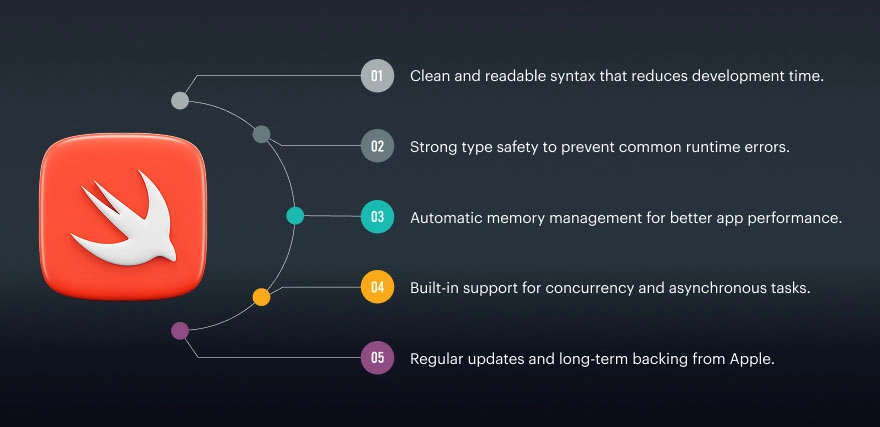
Created especially for building programs for iOS, iPadOS, macOS, watchOS, and tvOS, Swift is Apple’s revolutionary programming language. Designed to be simple to read and write, it performs extremely well. Programmers can write safe, reliable, and Apple hardware-optimised programs with Swift. The majority of bespoke iOS app development projects now employ Swift because of its security features and Apple’s ongoing support.
Key Features of Swift:
- Clean and readable syntax that reduces development time.
- Strong type safety to prevent common runtime errors.
- Automatic memory management for better app performance.
- Built-in support for concurrency and asynchronous tasks.
- Regular updates and long-term backing from Apple.
X-Code:

Xcode is the centre of iOS mobile app development’s most important area of labour. Including code authoring, interface design, testing, and debugging, it provides all the tools needed by developers. Xcode interfaces straight with Apple’s SDKs to guarantee apps meet technical and security requirements before they are launched to the App Store.
Key Features of Xcode:
- Code editor with real-time error detection.
- Interface Builder for visual UI design.
- iOS simulators to test apps on different devices.
- Debugging tools for performance and crash analysis.
- Direct App Store and TestFlight integration.
Swift UI:
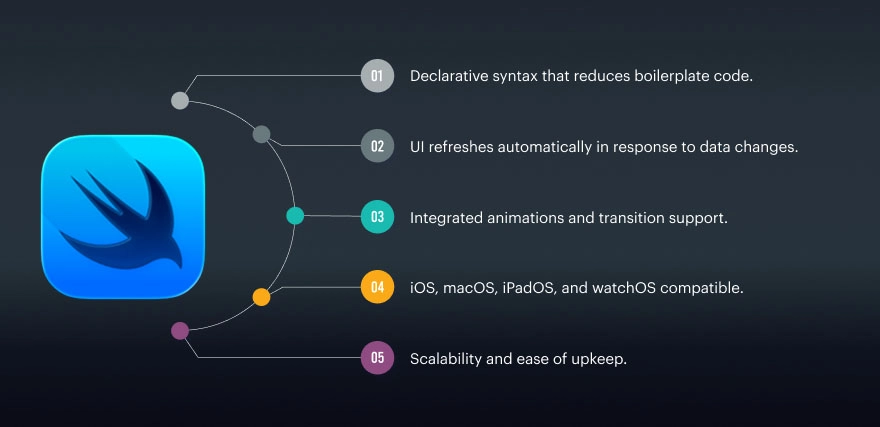
Developing user interfaces is made simpler with Apple’s more modern declarative user interface architecture, Swift. Rather than taking care of the UI logic, developers define how the interface should look and behave. SwiftUI is excellent for shorter development cycles since it immediately changes the user interface upon data changes. Many iOS app development companies use SwiftUI more and more for fresh projects since it is future-ready and efficient.
Key Features of SwiftUI:
- Declarative syntax that reduces boilerplate code.
- UI refreshes automatically in response to data changes.
- Integrated animations and transition support.
- iOS, macOS, iPadOS, and watchOS compatible.
- Scalability and ease of upkeep.
UIKit:

UIKit is Apple’s well-known user interface design framework. It suits complex uses since it lets one finely control layouts, animations, and interactions. Notwithstanding SwiftUI’s rising popularity, seasoned iOS app development companies continue to use UIKit often in corporate and legacy apps.
Key Features of UIKit:
- Fine-grained control over UI components.
- Extensive library of prebuilt UI elements.
- Powerful animation and gesture handling.
- Strong backward compatibility.
- Ideal for large-scale and complex apps.
ARKit:
Combining digital content with the actual world helps ARKit let developers create enthralling augmented reality experiences. It employs the device’s camera, motion sensors, and depth data to produce believable AR interactions. Often used in gaming, retail, education, and training, ARKit finds use here.
Key Features of ARKit:
- Real-world tracking and object detection.
- Motion and depth sensing capabilities.
- Seamless integration with Swift and SwiftUI.
- Support for realistic lighting and shadows.
- Optimised for Apple hardware.
MapKit:
Developers may include maps, navigation, and location-based capabilities into iOS apps via MapKit. Applications that depend on geolocation, like those for delivery, travel, or local services, find great need. For precise and effective mapping, MapKit links closely with Apple Maps.
Key Features of MapKit:
- Interactive maps and annotations.
- Turn-by-turn navigation support.
- Location tracking and geofencing.
- Search for places and points of interest.
- Smooth performance across Apple devices.
CoreML:
Developers may include machine learning models straight into iOS apps with Core ML. Core ML increases speed, decreases reliance on the cloud, and improves user privacy by executing models on the device. It is frequently utilised in the creation of custom iOS apps for functions including intelligent automation, image recognition, and recommendations.
Key Features of Core ML:
- On-device machine learning processing.
- Faster predictions with low latency.
- Enhanced data privacy and security.
- Support for multiple ML model formats.
- Optimised for Apple’s Neural Engine.
Working together, these technologies create a very integrated development environment that fosters quality, safety, and scalability. Using Apple’s official technologies guarantees developers provide excellent user experiences, pass App Store reviews, and perform consistently, making them a wise option for companies funding iOS app development services.

How Apple’s Ecosystem Influences App Architecture?
The architecture, upkeep, and scalability of iOS apps are much influenced by Apple’s ecosystem. Apple offers developers explicit frameworks, lifecycle standards, and architectural ideas to assist them in creating resilient and future-ready applications, unlike open platforms. High-performing and App Store-compliant apps need these architectural rules for any iOS app development business.
Architecture Designed for Clarity, Performance, and Growth
Architecture is really woven into Apple’s development approach, not an afterthought when making iOS apps. Apple promotes simple, modular layouts that enable long-term maintenance and comprehension of apps. As apps expand in size, user base, and feature complexity, this becomes increasingly crucial.
- In order to maintain the independence of business logic from the user experience, Apple encourages the separation of concerns.
- Clean architecture improves performance and reduces crash risks
- Well-structured apps are easier to update when iOS versions change
- Scalable architecture supports long-term custom iOS app development
Industry reports show that apps built with structured architecture patterns experience 30–40% fewer post-launch bugs, making architectural discipline a practical necessity rather than a best practice.
Modular and Scalable Code Structures
Apple’s ecosystem strongly supports modular coding through established architectural patterns. MVC (Model–View–Controller) and MVVM (Model–View–ViewModel) are two of the most widely utilised patterns in iOS mobile app development.
- MVC divides control logic, user interface, and data management into discrete layers.
- MVVM further improves testability by separating UI logic from business logic
- Modular code allows teams to work on features independently
- Easier testing and debugging improve long-term app stability
Most professional iOS app development services rely on these patterns to ensure apps remain maintainable as features expand and user demand increases.
App Lifecycle Management and Device Compatibility
The launch, foreground, background, and shutdown phases comprise Apple’s app lifecycle. An effective response of iOS apps to some conditions is necessary to prevent crashes, data loss, or performance problems.
- Apple APIs manage app state transitions smoothly
- Apps automatically pause or resume tasks during interruptions like calls or notifications
- Efficient lifecycle handling improves battery performance and responsiveness
It is also easier to support several Apple devices within the ecosystem. Shared SDKs and adaptive UI ideas enable developers to create designs that quickly flip between iPhones and iPads. Thanks to this integrated approach, iOS application development businesses may offer uniform experiences without duplicating code.
Cross-Device Experiences Within Apple’s Ecosystem
Apple’s ecosystem may transcend just personal devices by means of consistent promotion across many channels. With Universal Clipboard, Handoff, and iCloud Sync, consumers may easily switch across devices.
- Users can start tasks on one device and continue on another
- Shared Apple IDs enable real-time data syncing
- Developers create experiences, not only panels.
Apple use patterns show that over 60% of consumers regularly operate more than one Apple device, and cross-device architecture becomes a main issue in contemporary iOS app design.
How to Deal with App Store and Distribution?
Starting an iOS software on the App Store entails more than simply pressing the publish button. Apple prioritises quality, security, and customer confidence via a tightly managed distribution network. Companies putting resources into iOS app development must understand how the App Store distribution system operates in order to prevent post-launch problems, rejections, and delays. Before millions of people everywhere can get their hands on Apple’s methodical strategy, apps meet high standards.
How Apps Are Reviewed and Approved
Every iOS application sent to the App Store has to go under Apple’s App Review process, which entails expert team assessment. This process assesses technical performance in addition to user experience.
- Apps are reviewed for crashes, bugs, and performance issues
- Apple verifies that the app delivers clear value to users
- Consistent with Apple’s design principles, user interface and navigation are evaluated.
- Review of metadata includes app descriptions, screenshots, and permissions.
One of the fastest of any prominent platform, Apple’s review process assesses 90% of App Store entries in 24 to 48 hours. Applications not following the regulations risk refusal. Experienced iOS app development businesses painstakingly build presentations before submitting.
App Store Guidelines and Security Standards
Apple’s App Store Guidelines specify which applications may and cannot perform. These suggestions are often updated to reflect new privacy policies, platform updates, and security issues. Consistent with Apple’s first-attitude approach, these guidelines give security top priority.
- Apps have to thoroughly describe how user information is gathered and applied.
- Sensitive permissions for camera, location, and contacts require user permission.
- Apple-suggested methods should be used to protectively store data.
- Apps should not contain concealed capabilities or deceitful conduct.
Reports show that more than 80% of consumers favour apps that give privacy top priority. Apple’s tough policies provide a great benefit for companies providing tailored iOS app development. Following these values builds continuous consumer trust in addition to speeding up acceptance.
TestFlight and Beta Testing
Apple advises developers to use TestFlight, the company’s own beta testing tool, before distributing an app to the public. TestFlight enables external users or internal teams to assess programs in authentic environments.
- Up to 10,000 outside testers may be invited by developers.
- Testers provide feedback directly through the TestFlight app.
- Crash reports and performance data are automatically collected.
- Bugs can be fixed before public release.
Beta testing of TestFlight raises general app reliability and reduces the chance of negative reviews after release. Most skilled iOS app development companies use TestFlight to confirm capabilities, handle edge situations, and ensure uniform performance across devices.
What are the Common Questions About iOS App Development?
Companies and startups often ask many questions on Google and in customer meetings as they investigate iOS app development. These most commonly asked questions about how iOS applications function inside the Apple system are answered simply and clearly.
How long does iOS app development usually take?
- The app’s complexity and characteristics will determine the timetable.
- A simple iOS app could take three to four months; feature-rich programs can take six months or more.
- Planning, design, development, testing, and App Store approval all have a bearing on delivery time.
- Experienced iOS app development businesses often shorten delays by means of ordered procedures.
Is iOS app development more expensive than other platforms?
- Due to Apple’s design and quality standards, development of iOS typically entails a greater initial expenditure.
- Research indicates that iOS users spend almost double as much on apps as individuals on other platforms.
- Better long-run returns on the development of bespoke iOS applications often translate for businesses.
What tools are commonly used in mobile app development for iOS?
- Swift for writing fast and secure code
- Xcode for application construction, testing, and debugging
- Designing user interfaces using UIKit or SwiftUI
- Apple frameworks for sophisticated capabilities, including Core ML, MapKit, and ARKit
- These tools are very well linked, therefore enabling dependable and seamless growth.
How does Apple ensure app quality?
- Before being released, every application passes Apple’s App Review process.
- Performance, security, privacy compliance, and user experience are all examined in the app.
- Apple enforces strict data usage and permission guidelines.
- According to industry data, over 90% of users trust App Store apps more due to this review system.
- This quality control benefits users and businesses relying on iOS app development services.
Can iOS apps work across multiple Apple devices?
- Yes, iOS apps can be customised for iPhones, iPads, and even Macs.
- Apple’s shared SDKs and best adaptive user interface design simplify multi-device help.
- Simple cross-device experiences result from features like Handoff and iCloud Sync.
How important is security in iOS app development?
- From the ground up, Apple’s ecosystem includes security.
- Permissions-based access, encryption, and safe APIs must be used by applications.
- To safeguard user information, Apple often revises its security rules.
- This makes iOS a great option for apps dealing with sensitive data.
Why should businesses choose a professional iOS app development company?
- Strict rules governing Apple’s ecosystem call for technical knowledge.
- Professional teams know App Store standards, performance optimisation, and security best practices.
- For iOS, this guarantees quicker approvals, fewer rejections, and scalable mobile app development.
Fragmented apps fail across Apple devices?
Unify experiences in Apple’s ecosystem.
What are the Challenges Within the Apple Ecosystem?
Even as there are disadvantages to designing programs inside Apple’s ecosystem, developing iOS applications provides excellent performance, security, and user confidence. Particularly crucial for businesses seeking long-range growth and scalability before beginning iOS mobile app creation is awareness of these issues.
The following are the primary difficulties outlined simply, along with important industry insights:
Strict App Store Review Guidelines
Apple’s App Store Review process is strict and non-negotiable. Even minor UI errors, unclear privacy rules, or performance issues can lead to rejection. According to reports, policy infractions result in the rejection of between 30%-35% of initial app applications. Because of this, working with a seasoned iOS app development business is essential.
High Security and Privacy Compliance Requirements
Apple has strict standards for encryption, data privacy, and user consent. Apps have to be upfront about gathering, storing, and using user data. For more than 80% of Apple’s consumers, data privacy comes first. Thus, Apple’s stringent approach increases confidence but also raises the effort required for growth. In custom iOS app creation, correct security is critical.
Limited Customisation Compared to Open Platforms
In order to preserve security and performance, Apple limits deep system-level access. Developers are required to operate within predetermined frameworks such as SwiftUI and UIKit. Although this guarantees uniformity, it may restrict novel or experimental features.
Device and OS Compatibility Challenges
Apple releases fresh iOS versions and device models regularly. Apps must be designed for a range of processor designs, screen sizes, and resolutions. According to business statistics, about 70% of iOS users switch to the most recent OS within months, therefore forcing developers to keep updating.
Cost of Development and Maintenance
Initial expenses could increase due to Apple hardware, developer program fees, and testing needs. Constant updates are required to match new iOS releases and security patches. iOS consumers spend more, which sometimes balances out long-term expenditure on iOS app development services.
Dependency on Apple’s Tools and Ecosystem
Development depends significantly on Apple tools, including Xcode, Swift, TestFlight, and Apple APIs. Development timelines are directly affected by any modification or devaluation of Apple frameworks. This dependency requires continuous learning and adaptation by development teams.
Approval Delays and Update Bottlenecks
Even app updates must pass Apple’s review process. Time-sensitive fixes or feature rollouts may face delays. This slows down market reaction and product iteration for rapidly expanding companies.
What are the Trends Shaping iOS Development in 2026?
The expanding Apple ecosystem suggests that iOS app development will be more sophisticated, secure, and user-centric in 2026. From privacy-first design to artificial intelligence-driven experiences, these advances are transforming how apps are developed, distributed, and used on Apple devices.
Here are the key trends explained in a simple, engaging way:
On-device intelligence and AI power
To advance on-device artificial intelligence, Apple is employing Apple Silicon and Core ML. Apps locally process data these days, hence speeding up and protecting privacy. AI is a crucial component in the creation of personalised iOS apps since studies reveal that more than 65% of users prefer apps that tailor experiences without exchanging data with third parties.
SwiftUI as the Primary UI Framework
For current iOS interfaces, SwiftUI is becoming the first option. It promotes quicker development, cleaner code, and uniform design across Mac, iPhone, and iPad. Many iOS app development companies now give SwiftUI top priority to save up to 30–40% in development time.
Stronger Focus on Privacy-First App Design
Apple’s App Tracking Transparency (ATT) and privacy tags are guiding the development of apps. Talking honestly about how data is handled helps developers to develop openness and trust. Mobile app development for iOS is increasingly a standard for safe app practices as privacy concerns increase all over.
Cross-Device Experiences Across Apple Products
Designed to operate perfectly across Mac, Apple Watch, iPad, and iPhone are apps. Features like Handoff, universal control, and iCloud synchronisation are now anticipated by users. Since almost 75% of Apple users own several Apple devices, ecosystem-wide consistency is very important.
Increased Use of AR and Spatial Experiences
ARKit is powering immersive gaming, healthcare, education, and retail. Apple’s increasing emphasis on spatial computing is forcing developers to consider past flat screens. AR-enabled apps have shown up to 2x higher user engagement compared to standard apps.
Subscription-Based and In-App Purchase Models
Apple’s secure payment ecosystem continues to boost subscription apps. Apps using subscriptions report 20–30% higher long-term revenue stability. This trend is influencing how iOS app development services structure monetisation strategies.
Faster Performance with Apple Silicon Optimisation
These days, Apple’s own CPUs are taken into consideration when creating apps. These days, smoother animations, faster load times, and longer battery life are normal needs. Every iOS app development firm now uses performance optimisation as a major selling feature.
Low-Code Support and Modular Development
Apple’s improved APIs encourage modular and reusable code structures. This reduces bugs and simplifies updates when new iOS versions are released. Modular architecture is now a standard practice in scalable custom iOS app development projects.
Let’s take a closer look at the common challenges in SPA development that matter most in 2025, along with practical ways to address them.
1. SEO Limitations
One of the most vital concerns for each unmarried-page utility platform is search engine optimisation. Because SPAs usually load content via JavaScript, conventional seek engine crawlers regularly struggle to index them properly. While frameworks like Next.js and Nuxt.js have protected Server-Side Rendering to enhance search engine optimisation visibility, no longer do all SPAs.
2. Performance Optimisation
SPAs are designed for speed, but their initial load time can sometimes be slow. Because before rendering anything on the screen, the browser must download the full JavaScript package, HTML, and CSS. The beginning of the application may be delayed by a high initial payload, particularly on mobile networks or older devices.
3. Security Risks
SPAs may be susceptible to security risks like Cross-Site Scripting, Cross-Site Request Forgery, or unauthorised API access if they are not adequately secured because of their substantial reliance on APIs for data retrieval. When web app development businesses create apps that handle sensitive data, like banking or healthcare data, data protection becomes even more crucial.
4. Browser Compatibility
Apps may act differently on different platforms because each browser reads JavaScript differently. Users with obsolete systems may experience problems since some JavaScript capabilities and contemporary APIs may not be supported by older browsers.
5. State Management
Managing and coordinating the shared state data between SPA components may be difficult. When several components depend on the same data, inadequate state handling could lead to problems and inconsistent data. To solve this problem and maintain data consistency throughout the application, developers commonly employ state management frameworks like Redux, Pinia, or MobX.
6. Memory Leaks and Performance Bottlenecks
Memory leaks can occur when SPAs remain open for extended periods of time, particularly when developing enterprise web apps. These leaks occur when unnecessary data or event listeners are not cleared from memory, gradually slowing down performance.
7. Poor Offline Support
Most SPAs do not operate offline by default, in contrast to Progressive Web Apps. When the internet connection drops, users could become agitated, particularly in areas where mobile devices are the primary mode of mobility.
8. Scalability and Code Maintenance
As SPAs expand, managing their architecture becomes more difficult. Long-term program maintenance may be difficult if developers working on the same codebase have different coding styles. TypeScript, component-based programming, and modular architecture can all help make code more understandable and scalable.
Navigating Apple’s fragmented device ecosystem?
Seamlessly integrate across iOS platforms.
Conclusion
From security and distribution to design and architecture, Apple’s ecosystem impacts all facets of iOS app creation. Apple guarantees consistent performance, faster operating system acceptance, and a unified user experience across devices by controlling both hardware and software.
Developers can concentrate on creativity instead of compatibility issues since more than 90% of modern iPhones are running the most current iOS updates, hence producing dependable and predictable iOS mobile app development.
The ecology has profoundly incorporated security and privacy, therefore affecting every phase of growth. Strict App Store rules, encrypted data management, and privacy-first capabilities, including App Tracking Transparency support the development of user confidence. Companies choose expert iOS app development services, especially when creating consumer-facing applications needing dependability and compliance, since safety is so important.
Apple’s ecosystem gives an organised but adaptable setting for developing scalable, top-notch applications. Companies can totally use this ecosystem to provide safe, future-ready solutions when under experienced iOS app development firm. Custom iOS app creation inside Apple’s framework is about generating long-term worth via performance, trust, and flawless user experiences rather than simply satisfying criteria.
FAQs
iOS app development is built around Apple’s tightly controlled ecosystem, where hardware, software, and services work together. This results in better performance, stronger security, and a consistent user experience.
The Apple Developer Program gives access to essential tools like Xcode, TestFlight, and App Store distribution. It also ensures apps meet Apple’s quality, privacy, and security standards.
Apple uses strict App Store review guidelines, automated checks, and manual reviews to maintain quality. This process helps remove unsafe apps and improves overall user trust.
Developers mainly use Swift, Xcode, SwiftUI, UIKit, and Apple frameworks like Core ML and ARKit. These tools help build fast, secure, and scalable iOS applications.
Yes, custom iOS app development allows businesses to build tailored solutions that align with Apple’s ecosystem. It ensures better performance, scalability, and long-term compatibility with future iOS updates.
Samuel Meleder
Samuel Meleder founded Chimpare, a global company that builds software solutions. With a passion for innovation and a commitment to helping businesses grow through smart digital strategies, Samuel leads a global team delivering cutting-edge solutions across industries
Found this post insightful? Don’t forget to share it with your network!
Related Articles

What Tools Do Developers Need for Android App Development?
Building an Android app was, at one time, simply a few lines of code and the immediate display of the

How is Custom Software Development Helping UK Companies?
Companies in the UK are conducting their business in a highly digital and cutthroat environment. Custom software development is helping

Why is Everyone Investing in E-Commerce Website Development?
It is an idea that e-commerce is “just another digital trend”, but online shopping has really changed a lot in