
[ez-toc]
Building an Android app was, at one time, simply a few lines of code and the immediate display of the result on a device. Nevertheless, it has grown into a detailed procedure by 2025, which entails planning, coding, UI designing, testing, and launching the app. In a situation where Android is the OS for more than 2 billion smartphones, tablets, wearables, and other smart devices globally, the users are asking for higher standards and more features.
Whatever situation you might be in as a developer working on your own, a member of an in-house tech team, or collaborating with a skilled Android app development company, the instruments you pick can either positively or negatively influence your project. An apt assemblage of Android programming instruments empowers developers to work efficiently, be less prone to errors, improve the app performance, and deliver a consistent user experience for different screen sizes and Android versions.
Given the array of tools from Android Studio to prototyping, testing, debugging, and backend services, contemporary Android mobile development is dependent on a harmonious set of tools rather than a monolithic solution. This is especially important for businesses offering Android app development services or custom Android app development services, where speed, scalability, and quality directly impact client satisfaction.
Here, we explain the necessary developer tools for creating an Android application in a way that is straightforward and practical. If you are a newbie and have no idea, or you are simply curious about how a professional Android app development agency works to build a sturdy mobile app development, after reading this guide, you will know which tools are important, what the purpose of using them is, and how they relate to the general Android development process.
Too many Android tools create confusion and slow development.
Simplify Android tool selection
Book Your Free App Consultation
What is Android App Development?
Android app development basically means the writing of programs that can work on Android devices. But the devices are not only limited to smartphones and tablets, but they also include smart TVs, smartwatches, in-car systems, and even IoT devices. Simply stating, it is the app creation process that results in a product which is functional and user-friendly, which can be downloaded and used on Android devices by people.
The developer team is the one who usually decides the function and the target users of the app first. After that, developers, through coding in languages like Kotlin or Java, will build the software, make the UI which is in line with Android’s Material Design standards, and, if it is required, they will link the app to databases, APIs, or cloud services.
After the features have been made, the application is tested on different devices and various Android versions to check its stability, and thus, it is uploaded to the Google Play Store.
A modern Android app development environment is primarily characterised by a comprehensive set of tools that are available to support each step of the procedure. Developers are able to build apps more quickly, lessen mistakes, and keep up a consistent level of performance thanks to the tools that range from the official ones, such as Android Studio for coding and debugging, to emulators for testing and backend platforms for data handling.
This is the reason why the top-tier engineering teams in an Android app development company or providing Android app development services are very much dependent on the appropriate toolset as opposed to manual methods.
For enterprises that require personalised Android app development services, developing an Android application is essentially a software task involving the creation of scalable, secure, and user-friendly mobile solutions.
An experienced Android app development company uses dependable tools and adheres to ideal working methods to ensure that the apps delight the users, remain compatible with future updates, and, thus, make a real profit in the highly competitive mobile market.
What are the Key Roles & Responsibilities of Android Developers?
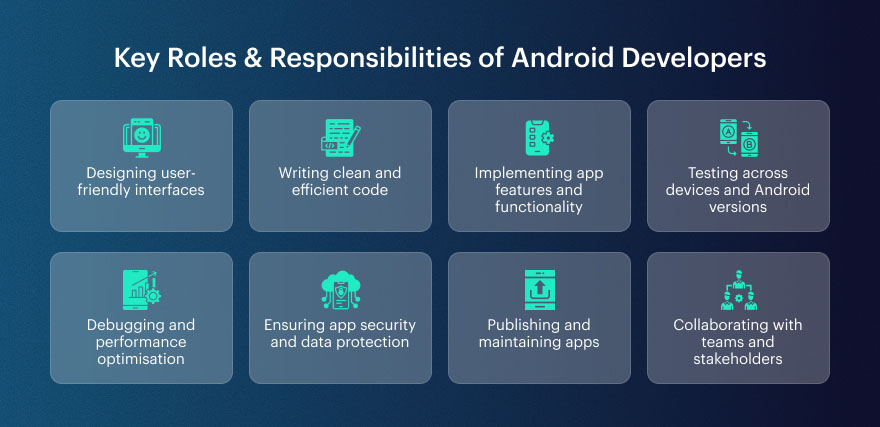
Before analysing the tools utilised in the development of an Android app, it is worth figuring out what an Android developer does daily. As they see, it’s not just coding; they are the ones who are responsible for building the whole app journey, starting from the very first user interface to the app’s working over time after the release.
Developers are essentially the ones who make the idea of a safe and user-friendly mobile app come true; hence, they can be regarded as the core power of the mobile industry. A developer, solo or in a team of an Android app development company, doesn’t cause any change.
What are the major jobs and the main responsibilities of Android developers? The answer is provided here with the aid of straightforward language:
Designing user-friendly interfaces
In general, Android developers and designers work hand in hand to build intuitive experiences that follow Material Design standards. The main objective is to make the app nice-looking and usable for different screen sizes and Android devices.
Writing clean and efficient code
Programmers use languages like Kotlin or Java to build software which is logically structured, clear, and can be maintained with minimal work. In this way, the applications become efficient, and the developers will have an easy time making updates later on, especially if they are a team providing long-term Android app development services.
Implementing app features and functionality
From login systems and push notifications to maps, payments, and APIs, developers build and integrate core features that bring the app’s purpose to life.
Testing across devices and Android versions
Android apps have to be compatible with different devices and various OS versions, hence testing is done on the real devices as well as emulators.
Debugging and performance optimisation
Bug locating, crashes fixing, app speeding up, these are the continuous activities of the developers. To optimise the app memory, battery, and loading time, developers use debugging and profiling tools.
Ensuring app security and data protection
As part of good practice, developers take measures to secure user data, handle permissions correctly, and ensure that their app is free from any security loopholes, which are among the most important aspects of a custom Android app development service focused on.
Publishing and maintaining apps
Once the application is prepared, developers take care of Play Store updates, bug fixes, and adding new features according to user feedback.
Collaborating with teams and stakeholders
Likewise, in an Android app development company, developers usually collaborate tightly with designers, testers, project managers, and clients to confirm that the app satisfies the technical and business objectives established.
The best Android developers blend creative thinking with solid technical skills. Knowing their duties in-depth, one can easily understand the necessity of the right tools for the fast and efficient production of top-notch Android apps on a large-scale.
What are the Core Android App Development Languages?
Every Android app basically runs on the programming language that was used to create it. The selection of the appropriate language is a significant factor determining the speed of app development, the ease of its maintenance, and the app’s performance in the long run. Essentially, the developers of contemporary Android applications utilise three principal languages which together cover the entire Android environment.
Below is a concise explanation of the main languages for Android app development that are being employed nowadays:
Kotlin
Kotlin is the language that Google officially recommends for Android development, and that is why it has been the main choice of developers and teams of an Android app development company. The language comes with a neat and short syntax, which allows developers to do less coding for the same result. By far the most attractive feature of Kotlin is null safety, which is the main source of well-known runtime errors, which is why it is very helpful in increasing the app’s stability. Moreover, it is compatible with the present Java code without any issues; therefore, it is great for both newly built apps and those that are being updated.
Java
Java has been the backbone of Android app development since the platform’s early days. Java is still extensively used and is a language fully compatible with Android, even though Kotlin is the language of choice for new projects. A significant number of apps, libraries, and frameworks have been developed using Java; it is a worthwhile language for developers who are tasked with the maintenance and upgrading of these. If a company provides Android app development as a service over a period of time, then the proficiency in Java will still be of great use as a result of its reliability and the big community of developers.
Dart
Dart is, by and large, known as the programming language of the Flutter library, which is a cross-platform development framework launched by Google. Flutter enables developers to write a single code that can work on both Android and iOS platforms, and thus, this is the main reason the device is a favourite tool among the teams that are engaged in delivering custom Android app development services on a shorter timeline. Dart has an easy-to-understand syntax, is very efficient, and makes UI development quicker, which is why a large number of modern Android app development companies are choosing it for their multiplatform projects.
Basically, Kotlin is the go-to language for Android native development, while Java is used for legacy and enterprise systems, and Dart is the language that offers cross-platform flexibility. Developers who know the perfect moment and way of using each language can work with the proper instruments to create Android apps that have a great scale of performance and can be easily refreshed in the coming.
Poor tool choices increase Android development costs.
Optimize your Android toolkit
What are the Essential Android App Development Tools?
Building an Android app that performs well and looks good is not just about coding, but also about using the right tools at each stage of the process, i.e., the design, development, testing, and deployment stages.
Since Android is continuously evolving to various devices and OS versions, a developer with the proper set of tools can do their work efficiently, and their app will be less prone to crashes.
If you are a single developer or a member of an Android app development company, modern Android app development services cannot do without IDEs, UI tools, backend platforms, and mobile app testing solutions that help in building secure, scalable, and user-friendly applications.
IDE & Essential Development Tools:
Android Studio:
Android Studio is the official IDE for the development of Android applications and the primary tool for almost every professional Android app development company. It basically consolidates all the tools a developer might require in one place, along with a code editor, a visual layout editor, an emulator, a debugger, and a performance profiler.
The IDE, which is solely for Android, was created with and supports both Kotlin and Java. It doesn’t fully support the Android SDK and uses Gradle for development automation. The smart code completion, error detection, and testing facilities of Android Studio allow developers to build robust and scalable apps in a shorter time.
IntelliJ IDEA:
IntelliJ IDEA is a feature-rich IDE created by JetBrains and is the core upon which Android Studio is built. A lot of developers choose IntelliJ IDEA because it has superior code navigation, refactoring tools, and a wide range of features that enhance the developer’s productivity.
Even though it doesn’t come as an Android-specific tool out of the box, it can support Android development through plugins and is a great performer for big projects. Generally, a team of professionals providing a long-term service of Android app development will be found using IntelliJ IDEA as a tool to efficiently manage a complex codebase in conjunction with Android Studio.
Visual Studio / Xamarin:
Developers can use Visual Studio along with Xamarin to create Android apps in C# rather than using Kotlin or Java. In particular, this device is a great asset for teams that provide custom Android app development services and have to meet the requirement of cross-platform compatibility.
With the help of Xamarin, code can be shared among Android, iOS, and Windows apps, and at the same time, the apps can continue to use the native APIs. Visual Studio makes an excellent debugging environment, offers support for testing, and is very smoothly integrated with cloud services, thus being a viable solution for mobile development at the enterprise level.
UI & Design Tools:
Jetpack Compose:
Jetpack Compose is the latest Android UI framework that makes UI development very easy. The developers are free from the use of XML layouts; rather, they can use Kotlin code to build UI components. This is a declarative manner, which is quite efficient because it is faster, the code is neater, and it is simple to update.
Jetpack Compose is updating the UI instantaneously when the data is changed; there are fewer bugs and less boilerplate code. The majority of modern Android app development companies have embraced Compose as their preferred tool since it allows them to complete the work in less time while still producing a good-looking, highly responsive user interface.
XML and Material Design Guidelines:
For many years, XML was the main tool for designing the layouts of Android apps, essentially dictating the appearance and behaviour of different screens. These designs, when taken in conjunction with Google’s Material Design principles, XML aids developers in making interfaces that not only look good but are also consistent, accessible, and user-friendly.
Material Design offers standardised components, colour systems, and interaction patterns that make the app more user-friendly. XML is still very much in use, i.e. in the case of local Android app development projects and big enterprise apps, despite the existence of newer technologies like Jetpack Compose.
Backend & Cloud Tools:
Firebase:
Firebase is a Google backend platform that makes server-side development less complicated. It offers many services such as authentication, real-time databases, cloud storage, analytics, and push notifications. If developers want a secure and efficient way of managing data, they might opt for Firebase instead of building backend systems from scratch.
The reason why Firebase is the go-to platform for mobile app development outsourcing companies is that it not only enables quick app development but also offers easy integration with Android apps besides automatic scaling.
REST APIs & Backend Integration:
REST APIs are what make it possible for Android apps to talk to servers, databases, and other services that are not part of the app. Just by connecting with an API, an app can download data, carry out a payment, verify a user, or even update information at the very same time.
To keep the communication as light and quick as possible, devs are mostly on the lookout for HTTP-based APIs with JSON as a response format. Without the right backend integration, it is almost impossible to have a fully-featured app, a situation that is of most concern to businesses that offer custom Android app development services and are dependent on real-time data.
Build & Automation Tools:
Gradle Build System:
Gradle is the chief build automation tool that is primarily used in Android. Along with managing dependencies, it also performs code compilation, starts the tests, and creates APK or AAB files for the app’s distribution. Gradle is a tool developers can use to configure different build variants, manage app flavours, and automate their repetitive work. In the case of any professional Android app development company, Gradle is indispensable for keeping builds clean and making sure that app releases remain stable across different environments.
CI/CD Tools:
Continuous Integration and Continuous Deployment (CI/CD) tools such as Jenkins and Bitrise are the means by which tests and the delivery of apps are automated. The tools ensure that apps are built and tested automatically for every code change, thereby minimizing the possibility of errors and making the releases faster. The use of CI/CD pipelines is mandatory for teams operating in an Android app development agency environment, as they are the means through which code quality, quicker feedback, and more efficient deployment cycles are maintained.
Using outdated Android tools affects app performance.
Upgrade to modern Android tools
Libraries & Frameworks:
Retrofit:
Retrofit is one of the best networking libraries for Android applications that are used to handle API communication. One can easily make HTTP requests by using Retrofit, and the JSON responses can be very simply converted into Java or Kotlin objects.
The library is pretty minimal and efficient in its operation, and can be used without any problem with REST APIs. Its popularity in the modern Android app development community is because it takes less code and makes the network more stable.
Glide & Coil:
Glide and Coil are image loading libraries that are usually employed for the efficient display and caching of images in Android apps. The main purpose of these libraries is to ensure that the memory is not heavily loaded, the images are loaded quickly, and the scrolling is done smoothly.
Coil is essentially a Kotlin library, and thus, it has the best compatibility with the latest Android architectures. On the other hand, Glide is famous for its strength and adaptability. Basically, these two instruments are a must for any Android app that is loaded with images or other types of media content.
Testing & Emulator Tools:
Android Emulator:
The Android Emulator is basically how developers can test their applications on virtual devices without the need for real hardware. They can even simulate different screen sizes, Android versions, and hardware configurations with this tool. It is an indispensable instrument in the process of app development in the Android environment for the development of cross-compatible and high-performance apps.
Genymotion:
Genymotion is an Android Emulator or platform that can be described as an external source, which is mainly used for advanced and fast testing of Android applications. Some of its features include multiple device profiles and cloud-based testing, which leads to a great testing environment for professionals. The major part of the Android app development companies have adopted the use of Genymotion in their QA process so as to quicken the tests and to be sure of the app behavior consistency.
Espresso & UI Testing:
Espresso is the UI testing framework which is part of the Android development suite and is the main tool to simulate user interactions and check app behaviour automatically. So if any button, form, or navigation flow is malfunctioning, Espresso will catch it.
The usage of automated UI testing is a major factor that leads to app stability, and thus, the number of bugs is drastically reduced in the pre-release stage, which is the reason why this tool is indispensable for development teams that put great emphasis on their product’s quality.
Version Control & Collaboration:
Git & GitHub GitLab:
Git is the software that records changes to files and allows multiple developers to work on the same files simultaneously. Services such as GitHub or GitLab offer the means for groups to govern repositories, do code review, and execute releases. Using version control is at the core of any Android app development agency, where it guarantees the safety of the code, teamwork, and its viability over time.
Debugging & Performance Tools:
Android Debug Bridge (ADB):
ADB is mainly a command-line tool through which developers give instructions to an Android device. Its functionalities include app installation, recording logs, debugging and device management. The use of ADB is highly essential when a developer is in the process of creating an app or fixing bugs on the app.
Profiler Tools:
The profiling instruments of Android Studio are the proper means by which developers keep track of CPU usage, memory consumption, and network activity. Such knowledge is a great help in performance optimisation, crash saving, and battery saving, which are the main things that good Android apps require.
Cross-Platform Development Tools:
Flutter:
Flutter by Google is a cross-platform framework that enables developers to create both iOS and Android apps using a single codebase. The language is Dart. The framework provides quick development cycles and near-native performance. Flutter has become a popular choice among the providers of Android app development services who want to reach multiple platforms.
React Native:
React Native is often a go-to tool among programmers when it comes to developing Android applications using JavaScript and React. The advantage of this technology is that it allows a single codebase to be shared between different platforms, yet the application can deliver a performance that is very close to that of a native app. In order to halve the development time and the money needed, many startups and companies have decided to use React Native Development.
Prototyping & UX Tools:
Figma:
Figma is a web-based design tool that primarily focuses on UI/UX design and prototyping. As both designers and developers can collaborate simultaneously, the handoff time that is usually used for the transfer between design and development is therefore saved. Figma has become a major instrument in the process of modern Android app.
Adobe XD / Sketch:
Adobe XD and Sketch are design and prototyping tools that assist in making wireframes and creating the interaction of the design. They provide the visual representation of the app layout, which is the core idea before the real development, hence the changes are less and the clarity of the design is more.
Security, Monitoring & Crash Reporting:
Instabug / Crashlytics:
Instabug and Firebase Crashlytics are two platforms that help in the tracking of crashes, bugs, and user feedback in applications that are already live. Both these tools give developers a very comprehensive view of the errors and also a performance overview, which is why the techies can work on the fixes at great speed and consequently their app becomes more stable after the release.
What are the Best Practices for Choosing the Right Tools?
One of the main points in the procedure of making an Android application is the choice of the correct tools. If you are confronted with a great number of tools, it is wise to pick those which are the most appropriate for your project and team, instead of trying to use every single tool that is available.
In any case, whether you are creating an app internally or using a skilled Android app development company, it is a basic best practice that will help you steer clear of unnecessary troubles and ensure that the development process will be more relaxing.
Start with your project requirements
The initial step is to know precisely what you intend to build. Normally, natively developed Android applications will be able to leverage the benefits through the use of tools like Android Studio, Kotlin, and Jetpack Compose, while cross-platform projects may be more suitably created with Flutter development or React Native. Choosing tools that align with the goals, performance criteria, and target devices of your app is pretty much like making a decision that will spare you the trouble of having to redo your work later.
Consider your team’s skills and experience
Tools by themselves are only powerful until your team is proficient in using them. An Android app development agency usually decides on the tools depending on the developers’ knowledge of certain languages and frameworks. For instance, a team experienced in Kotlin could decide to go for native tools, while a team good at JavaScript might opt for cross-platform tools.
Look for strong community and long-term support
Tools that are popular with an active community, frequent updates, and good documentation are more friendly and easier to maintain. The importance of this factor is even more crucial for companies providing Android app development services for a long time, as features supported by community tools highly minimise the risks of bugs, security issues, and compatibility.
Focus on scalability and maintenance
The appropriate tools must be able to back up the expansion that is planned for the application, updates, and new features. In the case of companies that offer customised Android app development services, scalable tools are a way to keep the app not only stable but also it can be easily upgraded with the increase of users’ requirements.
In this way, developers are able to construct Android applications in a more effective manner and at the same time deliver higher performance and a better user experience by justifying the use of tools with the requirements of the project, the proficiency of the team, and the objectives that extend beyond the immediate term.
Conclusion
Android app development is today quick, clever, and adaptable to a great extent but only if the right tools are used properly. Developers just can’t picture their coding without a mighty IDE and contemporary UI frameworks.
Their toolchain is made complete with testing, automation, and performance tools, and every tool is a main character in the overall stability and user-friendliness of an app. Developers have figured out how to reduce errors, speed up their work, and provide the same services to users from all devices by just having the right tools combination.
If you were a solo developer or working with a trusted Android app development company, it would be very important to you to be constantly updated with the changing tools and best practices. A modern Android app development service is not only about app building but also includes considerations such as scalability, security, and being future-ready.
Any Android app development agency, by simply investing in the right tools and using them effectively, will be able to convert ideas into high-performing mobile applications which will be really noticeable in today’s competitive app ecosystem.
FAQs
What tools are essential for Android app development?
Android developers make use of various tools and technologies to develop, test, and release apps in a time-efficient manner. The tools include Android Studio, Kotlin or Java, Gradle, Firebase, emulators, and a testing tool like Espresso.
Is Android Studio mandatory for Android app development?
Though not mandatory, Android Studio is the official IDE and is highly recommended as it delivers the integrated instruments for coding, debugging, testing, and performance optimisation.
Which programming language is best for Android app development?
Because of its concise syntax and safety features, Kotlin will be the primary programming language for Android development in the future, but Java is still quite popular and supported.
Are cross-platform tools good for Android app development?
Indeed, tools such as Flutter and React Native are great when you want to build Android and iOS apps from one codebase, thereby saving time and development effort.
How do development tools improve Android app quality?
Development tools are used for the purposes of automating testing, bug detection at an early stage, performance optimisation, and making sure apps run smoothly on various devices and Android versions.
Found this post insightful? Don’t forget to share it with your network!
Leave a Reply